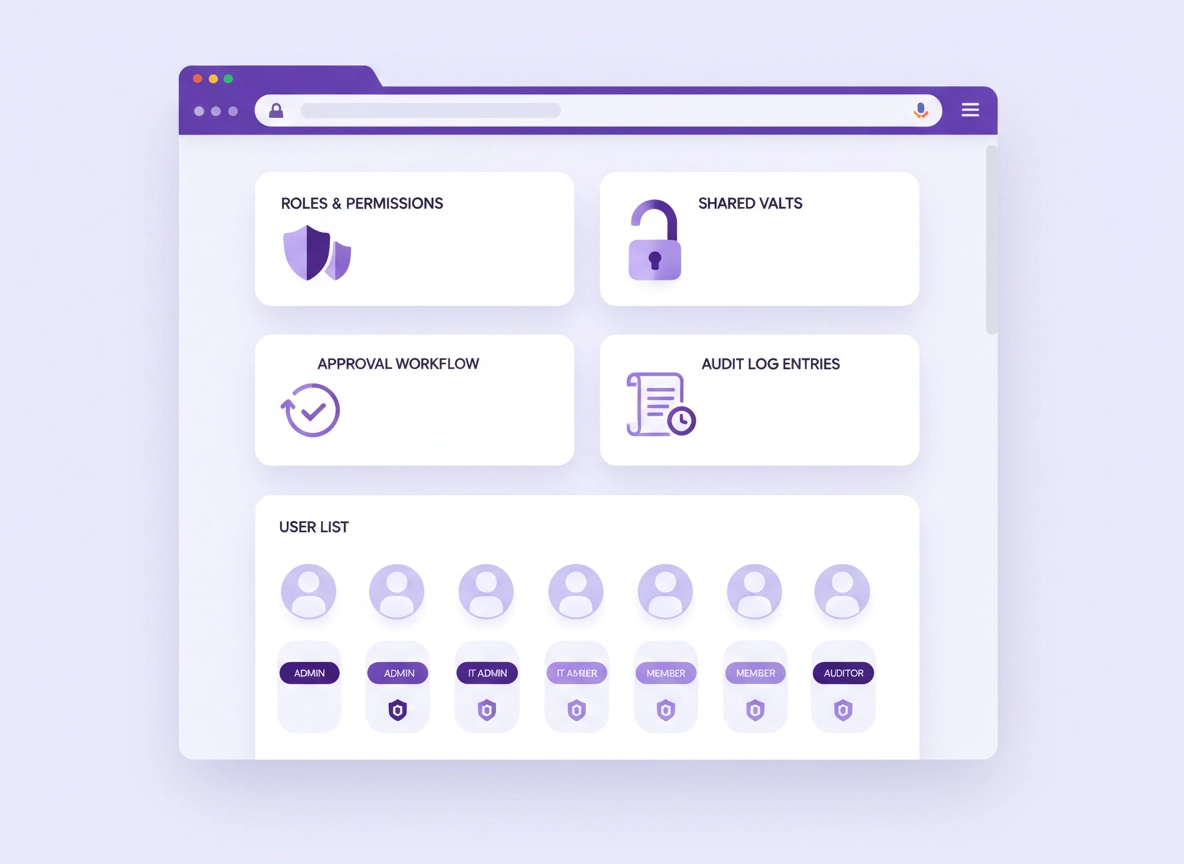
What RBAC is (and why it matters for Chrome password managers) .
RBAC is not “extra admin bureaucracy.” It’s how you prevent a single compromised account from turning into a company-wide credential spill.
A password manager inside Chrome is powerful because it sits right where logins happen: it can fill credentials, store secrets, share items, and sometimes even create or rotate passwords. That’s great for productivity—but it also means a mistake in access control can turn into a high-impact incident fast. RBAC (role-based access control) solves the scaling problem by assigning permissions to roles (Admin, IT Admin, Member, Auditor, Billing, Helpdesk) instead of managing every person manually.
In practical terms, RBAC decides things like: who can create shared vaults, who can invite users, who can recover accounts, who can view vault membership, who can export data, and who can see or generate audit logs. When you’re using a password manager as a Chrome extension, RBAC also interacts with browser realities like: user profiles, extension deployment, device management, and the fact that a user can be logged in across multiple devices.
If your team is growing (or you’re in any regulated environment), RBAC is the difference between: “Everyone has access to everything” and “Access is intentional, reviewable, and removable”. It also makes audits easier because you can show a reviewer your role definitions and prove that sensitive access is restricted by design.
Related: If your decision is still “Chrome built-in vs a dedicated tool,” start here: Chrome built-in password manager review and Chrome password manager vs third-party.
Key terms (quick definitions) .
- RBAC: Access control where permissions are assigned to roles (not individually per user).
- Least privilege: Users get only the permissions they need for their job—nothing extra.
- Shared vault / collection: A team space for credentials (e.g., “Finance,” “Marketing,” “Prod Ops”).
- Admin console: The management portal where roles, policies, users, and logs live.
- SSO: Single sign-on—using your identity provider to sign in (and enforce MFA, session policies).
- SCIM: Automated provisioning: create/deactivate users and assign groups based on your directory.
- Audit logs: A tamper-resistant record of actions (sharing, exports, role changes, device sign-ins).
What RBAC controls in a Chrome password manager (real examples) .
Password managers vary in naming, but the permission categories are usually the same. When you evaluate RBAC, look for controls in these buckets:
- User lifecycle: invite users, remove users, suspend users, force sign-out, manage recovery.
- Vault controls: create vaults, delete vaults, set vault membership, assign vault roles.
- Sharing & collaboration: share internally, share externally, allow links, approvals, time-limited access.
- Data movement: export vault, export items, import items, allow clipboard/printing controls.
- Security policy: require MFA/2FA, enforce SSO, master-password rules, device approval rules.
- Integrations: connect IdP, SCIM, directory sync, SIEM exports, API tokens, webhooks.
- Auditing: view logs, export logs, create compliance reports, alerting.
If your goal is real control (not just “pretty roles”), you want RBAC that can express at least: admin separation (security vs billing vs IT helpdesk), vault segmentation (teams don’t see other teams), and high-risk action gating (exports, external shares, recovery).
Before you start (fast checks + planning) .
RBAC projects go wrong for one boring reason: teams skip planning and try to “fix it live” while everyone is using the tool. Do these checks first so you don’t lock people out, over-share, or lose audit visibility.
Related: If this is a business rollout, also read: Password manager for Chrome business and Password manager for IT admins (Chrome).
- Check 1: Identity plan — Are you using SSO? If yes, decide whether you’ll enforce it for everyone or phase it in. (See Password manager SSO in Chrome.)
- Check 2: Team map — List your teams and the systems they manage (Marketing, Support, Finance, DevOps, IT). This becomes your vault/collection map.
- Check 3: High-risk actions — Decide who can export, create external shares, add integrations, and approve recovery.
- Check 4: Chrome deployment — If you manage devices, decide how the extension is installed (allowlist/blocklist, forced install, updates). (See Chrome extension security policy.)
- Check 5: Offboarding reality — How fast do you need access removed? “End of day” is not the same as “within minutes.” SCIM makes this immediate.
RBAC readiness: quick scoring (so you know what matters) .
If you’re choosing a password manager (or just validating your current one), here’s the quick test. A tool is “RBAC-ready” for serious teams if it can do most of the following without hacks:
- Separate admin duties (security admin vs billing admin vs helpdesk admin).
- Restrict exports (ideally: disable exports for most roles, allow only for a locked admin role).
- Control sharing (internal vs external sharing; link sharing; share approvals).
- Segment vaults (per-team access with granular rights like view/edit/manage).
- Enforce SSO + MFA (IdP-driven policies, not optional).
- SCIM provisioning (auto-add/remove users and map groups to teams).
- Audit logs you can export (and ideally push to SIEM).
- Device/session controls (force sign-out, session timeouts, new device approvals).
Step-by-step: RBAC setup that actually holds up in audits .
This setup is written to be tool-agnostic (because different password managers name things differently), but the sequence is deliberate: identity first, then roles, then vaults, then workflows, then logging. If you do it in the wrong order, you’ll spend your week fixing side-effects.
- 1 Pick your authority: Decide whether access is controlled primarily in the password manager (manual invites) or in your directory (SSO + SCIM). For teams, directory-driven is safer.
- 2 Create your “minimum viable” roles: Start with 3–5 roles (examples below). Assign the fewest permissions possible and add only when a real workflow breaks.
- 3 Build vaults/collections by team: Create vaults that match how work is done (Finance, Support, Marketing, DevOps, IT). Avoid “General” vaults that become junk drawers.
- 4 Set vault-level permissions: Apply read-only vs edit vs manage rights per role. A common baseline: most users can use credentials, fewer can edit them, almost nobody can manage membership.
- 5 Restrict high-risk actions: Disable exports for non-admins. Limit external sharing. Require approval for sharing outside the org, and for recovery or account takeover actions.
- 6 Turn on audit logging + alerts: Ensure role changes, exports, and external shares are logged. If possible, forward logs to your SIEM or monitoring stack.
- 7 Run a pilot with one team: Choose a “friendly” team (not Finance) and validate the workflow. Fix role gaps, then roll out gradually.
- 8 Lock it in with a quarterly review: RBAC drifts. Add a recurring access review: vault membership, admin roles, and external shares.
What “success” looks like: Users can sign in and do their work without “permission whack-a-mole,” while exports, external shares, and admin actions are restricted and auditable. Offboarding removes access quickly, and vault ownership doesn’t depend on one person.
Related: If you’re building an enterprise-friendly setup, these three pages connect tightly: Directory integration, Single sign-on (SSO), and Zero trust password manager approach.
Recommended roles (copy/paste mental model) .
Don’t invent roles based on titles (“Senior DevOps Ninja”). Invent them based on actions. Here’s a practical role set that works for many teams:
- Security Admin (very small group): controls policies (SSO enforcement, MFA rules, export restrictions), manages integrations, views audit logs, approves high-risk actions.
- IT Admin / Helpdesk Admin: can invite users, reset sessions, help with onboarding, but cannot export vaults or change security policies.
- Vault Manager (per team): manages membership and item structure for a specific vault (e.g., Support vault), but not global settings.
- Member: can use items, add/update credentials within assigned vaults, share internally if allowed.
- Auditor (read-only): view logs and reports, but cannot change anything.
- Billing Admin: manages subscription and invoicing only (no vault access required).
Common variations (Chrome platforms) .
- Windows / ChromeOS: If you manage endpoints, consider a managed browser (or policy) approach to enforce extension install and reduce “shadow extensions.” See Chrome enterprise management.
- macOS: Beware personal vs work profiles. If users run multiple Chrome profiles, ensure your RBAC assumes credentials only live in the managed profile.
- Android / iPhone: Mobile apps often have different session behaviors. Confirm “export” and “offline access” controls exist on mobile too, not just desktop.
Advanced RBAC: SSO, SCIM, approvals, vault segmentation, and logs .
Once you’ve got basic roles and vaults working, the “enterprise-grade” difference comes from four advanced layers: identity enforcement, automated provisioning, approval workflows, and auditable monitoring. These are the layers that prevent RBAC from quietly eroding over time.
Related: If your environment is managed, also browse: Enterprise password manager for Chrome and Chrome enterprise access control.
1) Enforce SSO (and don’t treat it as “optional”) .
RBAC without strong authentication is a fancy lock on a weak door. In serious teams, sign-in should happen via your identity provider (IdP) so you can enforce: MFA, conditional access, device posture rules, and rapid revocation.
- Baseline: Require MFA through your IdP, not “per-user optional MFA.”
- Session policies: Set reasonable timeouts; require re-auth for sensitive actions (exports, admin changes).
- Device trust: If your org supports it, limit access to managed devices for admin roles.
If you’re not sure where SSO fits into your rollout, read: Password manager SSO in Chrome.
2) SCIM provisioning: offboarding is where RBAC proves itself .
Manual offboarding fails in the real world. People forget. Laptops go missing. Contractors churn. SCIM (directory provisioning) makes access removal automatic and fast. The biggest RBAC win is not “who can see what,” it’s how quickly you can remove access everywhere.
- Group-to-vault mapping: Directory group “Finance” maps to Finance vault membership.
- Role assignment by group: Helpdesk group gets Helpdesk role; Security group gets Security Admin role.
- Immediate deprovision: When a user is disabled in the directory, access is removed (and sessions can be revoked).
Next steps: Password manager directory integration.
3) Approval workflows (the fix for “sharing chaos”) .
Most password manager incidents are not Hollywood hacks—they’re mis-shares, over-sharing, or silent exfiltration. Approval workflows add friction where it matters: when someone wants to share outside the org, grant broad vault access, or export.
- External sharing approvals: Require a Security Admin approval for any share to external emails/domains.
- New vault approvals: Keep vault creation limited; require justification (so you don’t get “misc vault sprawl”).
- Recovery approvals: Account recovery should be multi-party for admins (think: 2-person rule).
4) Vault segmentation patterns (what actually works) .
Vault design is RBAC design. If you dump everything in one vault, your roles won’t save you. Use segmentation patterns that match risk:
- Team vaults: Marketing, Support, Finance, DevOps, IT.
- Environment vaults: “Prod” secrets separated from “Staging/Dev” secrets.
- Client/project vaults: Only if you have clear owners and offboarding rules.
- Break-glass vault: Extremely restricted, used for emergency access only (audit-heavy, approvals required).
For teams who need secure collaboration, also see: Password manager team collaboration and How to share passwords securely in Chrome.
5) Audit logs: what you must be able to prove .
RBAC isn’t just about preventing bad actions—it’s about proving what happened when something goes wrong. At minimum, make sure you can see (and retain) logs for:
- Role changes: who granted admin rights, who removed them, and when.
- Vault membership changes: who was added/removed from a sensitive vault.
- Sharing events: internal shares, external shares, share revocations.
- Exports: export attempts and successes (with actor + timestamp).
- Sign-in anomalies: new device sign-ins, geo anomalies (if available), session revocations.
Related: If you’re building compliance-friendly controls, these pages connect well: SOC 2, GDPR, and HIPAA.
Common alternatives users compare .
Security notes, common misconfigurations, and baseline policies .
RBAC can look perfect on paper and still fail in practice—usually because of one “escape hatch”: exports, uncontrolled sharing, unmanaged devices, or an overpowered helpdesk role. Use this section as your “sanity check” before you call RBAC “done.”
Impact: RBAC affects credential exposure, offboarding speed, audit readiness, and blast radius during account compromise.
Related: If you suspect account compromise, phishing, or malicious extensions, read: Remove Malware and Chrome extension security check.
Recommended baseline settings (most teams) .
- Option A (balanced): SSO enforced for all users, internal sharing allowed, external sharing restricted to approved domains, exports disabled for members.
- Option B (maximum security): SSO + device restrictions for admins, no external sharing, exports only for Security Admin with approvals, strict session timeouts.
- Option C (compatibility-first): SSO encouraged (not forced) during transition, limited vault segmentation, exports allowed for a small admin group—but with heavy logging and periodic reviews.
Recommended settings by goal .
| Goal | Recommended RBAC choice | Tradeoff | Best for |
|---|---|---|---|
| Balanced | 3–5 roles, team vaults, exports disabled for members, internal sharing allowed | Slightly more admin work upfront | Most small-to-mid teams |
| Maximum security | SSO enforced, SCIM provisioning, external sharing off or approval-only, “two-person” rules | More friction for edge cases | Finance/health/legal/security-sensitive teams |
| Compatibility | Phased SSO, limited vault segmentation, careful helpdesk role, heavy logging | Higher risk until migration completes | Teams migrating from old tools |
The 7 RBAC mistakes that keep showing up .
- Too many admins: Admin sprawl turns “RBAC” into “everyone can do everything.” Keep admin roles tiny and reviewed.
- Exports left open: If members can export vaults, RBAC can be bypassed through data movement.
- No separation of duties: The same role can grant access and export data. Split security vs helpdesk vs billing.
- One giant vault: Vault segmentation is the real access boundary. One vault = one blast radius.
- External sharing not controlled: “Anyone can share to any email” is a silent leak waiting to happen.
- Offboarding is manual: Directory provisioning (SCIM) is how you remove access reliably and fast.
- Logs are not reviewed: Logging without review is like CCTV nobody watches. Add alerts or periodic review.
Next deep dive: If you want to understand what “good security posture” looks like in password managers, read password manager security features comparison and password manager encryption explained.
Troubleshooting .
Related: If the issue is extension permissions or suspicious behavior, see Chrome extension permissions guide and Chrome extension risk analysis.
If users can’t see vaults they should have access to .
This usually happens because the user is in the wrong directory group, the SCIM sync hasn’t applied yet, or the vault assignment is configured as “manual membership only.” Fix it by verifying: (1) the directory group membership, (2) the provisioning sync status, and (3) the vault-level permissions for that role. If the user is signed into multiple Chrome profiles, confirm they’re in the managed/work profile.
If helpdesk/IT can do “too much” .
Many teams accidentally grant helpdesk an admin role “so they can unblock people.” Split helpdesk from security: helpdesk can reset sessions and assist onboarding, but cannot change policies, view sensitive vaults, export data, or grant admin. If your tool supports it, create a dedicated Helpdesk role with a strict permission set.
If you see unexpected sharing or “mystery access” .
Start with audit logs: find the share event, identify the actor, and verify whether the share was internal or external. Then check whether link sharing is enabled (it can bypass “invite-only” models if misconfigured). If you need to tighten quickly: disable external sharing, disable public/share links, and require approvals for re-enabling. For deeper sharing controls, read password sharing securely in Chrome.
If SSO works but people still have access after leaving .
This is the classic “SSO but no provisioning” gap. SSO controls authentication; provisioning controls account lifecycle. If you don’t have SCIM (or you’re not using it), a deactivated directory account might not automatically remove password manager access, especially for existing sessions. Fix: enable provisioning, and ensure you can force sign-out or revoke sessions on deprovision.
If you need to reset safely (without blowing up access controls) .
Avoid “nuke and pave” resets unless you’re in an incident. Safe reset steps: export your role/vault configuration (if your tool supports it), capture a list of admin accounts and vault managers, verify logs are retained, then adjust one policy at a time (exports, external sharing, recovery). If you suspect a compromise, rotate high-risk credentials first (prod, finance, admin accounts).
FAQ .
-
helpIs RBAC only for big enterprise teams?No—RBAC matters as soon as you have shared credentials or contractors. Even a 5-person team benefits from vault segmentation and a rule that only one or two people can export or administer policies.
-
helpWhat’s the minimum RBAC setup that’s still “good”?Three roles is a strong start: Security Admin (policy + logs), IT/Helpdesk (onboarding + session help), and Member (day-to-day use). Add Vault Managers per team only if needed.
-
helpShould we disable exports completely?For most users: yes. Exports are a common exfiltration path. If you must allow exports, restrict them to a small admin group, require approvals if possible, and ensure exports are logged and reviewed.
-
helpHow does RBAC relate to compliance like SOC 2 or HIPAA?RBAC supports least privilege and access reviews—two recurring requirements in many audit frameworks. Pair RBAC with SSO/SCIM, audit logs, and a documented review cadence to make compliance evidence easier to produce.
Sources & further reading .
- Google Chrome Help Center
- Chrome Enterprise and education (Admin help)
- NIST: Role-Based Access Control (RBAC)
- OWASP: Security guidance and common risk patterns
Disclosure: Some pages may mention tools or services. Recommendations are editorial and based on practical security and usability criteria.