What password manager encryption actually means .
Encryption is not a single feature. It’s a chain of design choices that either holds up under real attacks — or collapses under weak key derivation, sloppy recovery flows, or unsafe browser integration.
When a password manager says “your vault is encrypted,” the important question is: encrypted with what key, derived how, stored where, and decrypted under what conditions? Two products can both claim “AES-256 encryption” and still have dramatically different real-world security, because the cipher is only one part of the story. The key and the surrounding system decide whether an attacker can brute force, phish, or trick a recovery flow to get plaintext.
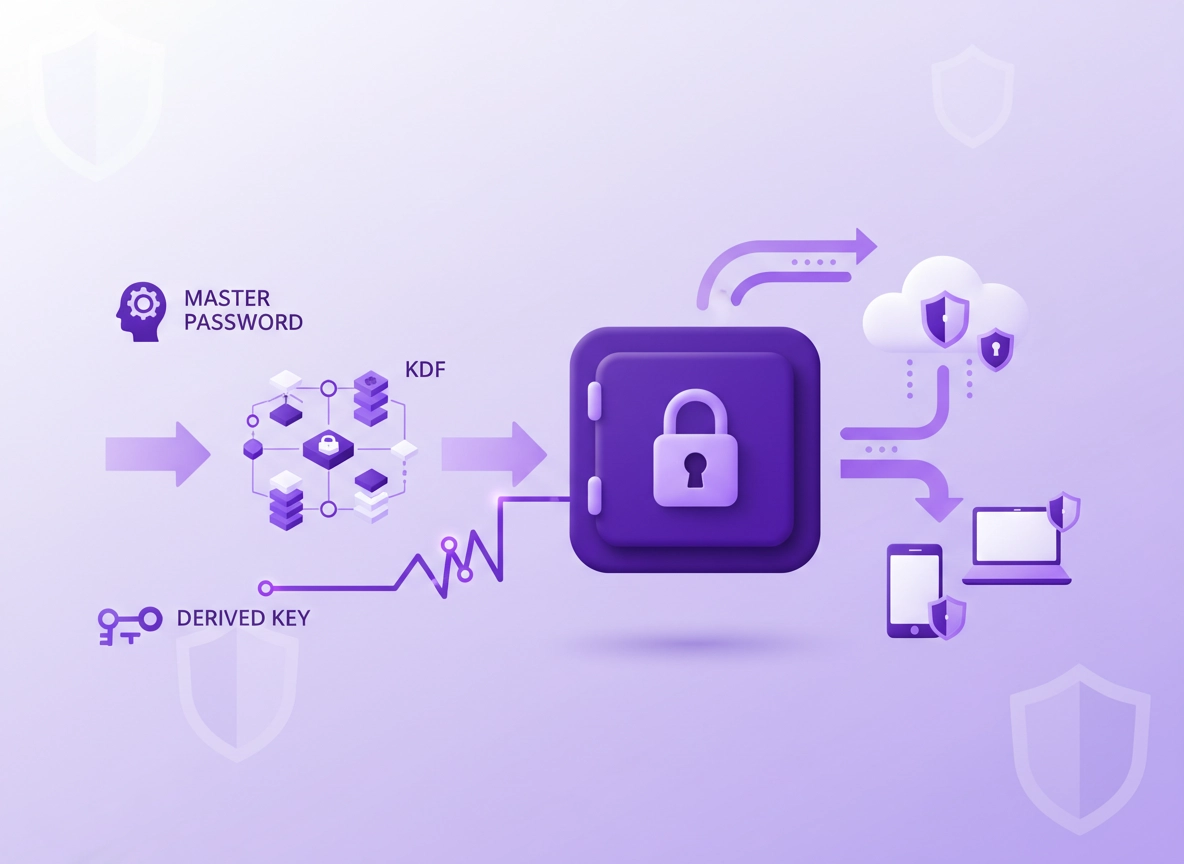
In a modern design, the vault is encrypted client-side (on your device). Your master password is never sent as-is. Instead, the app runs a Key Derivation Function (KDF) that converts your master password into a strong cryptographic key. That key then encrypts your vault data (logins, notes, cards, etc.) using an authenticated encryption mode such as AES-GCM or ChaCha20-Poly1305. The cloud sync service stores only ciphertext, and devices exchange updates over encrypted transport (TLS).
“Zero-knowledge” is the most abused term in the category. In a strict sense, it means the provider cannot decrypt your vault even if their servers are compromised, because they never possess the final decryption key. But there are edge cases: some managers add optional account recovery, admin recovery for business plans, or “trusted devices” features. These can be reasonable, but they change your threat model, and you should evaluate them explicitly.
Start here: If you’re choosing a product, our practical selection guide is Best Password Manager for Chrome. For “encryption-first” comparisons, see Encrypted Password Manager for Chrome.
Key terms (quick definitions) .
If you want the deeper “zero-knowledge” breakdown, read Password Manager Zero-Knowledge Architecture.
Before you start (fast reality checks) .
Encryption is a security control — not a magic shield. Before you compare algorithms, do three quick checks that prevent wasted time and “marketing-led” decisions.
- Check 1: Where does decryption happen? You want client-side encryption where the vault is decrypted only on your device.
- Check 2: What is the recovery model? “Easy recovery” can be great — but it may involve server-assisted key recovery or alternative keys.
- Check 3: Is there evidence? Look for independent audits, published security design, and clear KDF parameters.
- Check 4: Browser integration surface area If you’re using a Chrome extension, your risk also includes extension permissions, device malware, and session hijacking.
Related: If you’re evaluating Chrome-based solutions, also read Password Manager Browser Integration Security and Chrome Password Storage Security.
A quick mental model: “3 layers of encryption” .
A solid password manager typically uses three distinct layers:
- Layer 1 — Vault encryption (at rest): Your vault contents are encrypted with a strong symmetric key (AES/ChaCha20 family).
- Layer 2 — Key derivation: Your master password is processed by a KDF (Argon2/PBKDF2) + a unique salt to derive the vault key.
- Layer 3 — Transport encryption (in transit): Sync operations happen over TLS; this protects against network interception but does not replace vault encryption.
If any one of these layers is weak, the security story changes: weak KDF parameters can make offline cracking feasible after a breach; weak transport can expose tokens/metadata; weak extension isolation can leak secrets even if the vault is “perfectly encrypted.”
Step-by-step: how to verify a password manager’s encryption .
This section is designed for buyers, auditors, and anyone who wants to validate claims quickly. You do not need a cryptography degree — you need a checklist that turns vague statements into verifiable facts.
- 1 Confirm client-side encryption: The product should state that vault encryption and decryption happen on your device, not on the server.
- 2 Find the KDF and parameters: Look for Argon2id or PBKDF2 details (iterations, memory, parallelism). “We use a strong KDF” is not enough.
- 3 Confirm authenticated encryption: Prefer AES-GCM or ChaCha20-Poly1305/XChaCha20-Poly1305. Avoid “AES-CBC without integrity” unless paired correctly (it’s a red flag in consumer docs).
- 4 Check how keys are stored on device: Look for OS keychain / secure enclave usage, not plain localStorage. Browser extensions should avoid storing long-lived plaintext keys.
- 5 Review sync and metadata: Vault contents may be encrypted, but metadata (email, device names, IP logs, timestamps) may not be. Decide what you can accept.
- 6 Study recovery flows: “Forgot master password” can mean “no recovery” (true zero-knowledge) or “recovery via alternative keys.” Understand exactly what changes.
- 7 Look for audits and disclosures: Independent security audits, bug bounty programs, and transparent incident writeups are strong signals.
- 8 Validate browser extension security: Review permissions, consider enterprise extension allowlists, and reduce the blast radius of compromised sessions.
What “success” looks like: You can point to a specific document (security whitepaper / architecture page / audit report) that states: client-side encryption, the KDF and its parameters, the encryption mode (AES-GCM or ChaCha20-Poly1305), and a clear explanation of recovery and enterprise admin capabilities.
Related: If you’re comparing products and features, use Password Manager Security Features Comparison and the broader Chrome Password Manager Comparison.
How to read KDF settings without getting lost .
The job of a KDF is to make guessing the master password expensive. After a breach, attackers often try offline cracking: they take encrypted vault blobs and try billions of guesses. Your KDF is what turns that into “practically impossible” — or “fast enough to try a lot.”
- Argon2id (preferred in many modern designs): memory-hard (forces attackers to spend RAM, not just GPU cores). Key parameters: memory (MB), time cost, parallelism.
- PBKDF2 (common, still acceptable with high iterations): CPU-bound, easier to accelerate on GPUs than memory-hard designs. Key parameter: iteration count.
- Scrypt: older memory-hard KDF; can still be fine if configured strongly, but Argon2id is often favored today.
You’re not searching for a single “perfect number” because devices differ. You’re looking for evidence the vendor updates defaults, exposes tuning (or at least documents it), and designed for modern cracking economics. If a vendor hides parameters entirely, treat that as a maturity warning.
Common variations by platform .
- Windows / ChromeOS: Desktop apps often use OS-backed credential storage for session keys; browser extensions rely more on Chrome storage APIs and OS user isolation.
- macOS: Keychain integration is common; secure enclave may be used for biometric unlock depending on the app.
- Android / iPhone: Device-level keystores and biometrics can protect the local “unlock” flow, but your master password still matters for vault encryption and remote attack resistance.
Advanced: KDFs, vault formats, sync, and enterprise key management .
This is where high-quality password managers separate themselves: key hierarchy, encryption boundaries, secure sharing, admin controls, and the realities of browsers. You don’t need every detail to choose a product — but if you’re in a business or compliance context, you should know what questions to ask.
Related: For IT and managed deployments, start with Chrome Password Manager Deployment Guide and Password Manager for IT Admins (Chrome).
1) Vault encryption: what “AES-256” should imply .
AES-256 is a symmetric cipher with a 256-bit key size. On paper, brute forcing AES-256 is not realistic. In practice, the weak link is almost never AES. It’s how the encryption key is derived and managed. That’s why you should look for modern, authenticated encryption modes (AEAD).
- AES-GCM: widely used AEAD mode; provides confidentiality + integrity. Requires unique nonces (IVs) per encryption operation.
- ChaCha20-Poly1305 / XChaCha20-Poly1305: modern AEAD option; tends to perform well across devices and avoids some AES hardware dependency issues.
- Integrity matters: If encryption does not include integrity, attackers may be able to tamper with ciphertext and trigger weird behaviors.
2) Key hierarchy: master password, derived keys, and what gets stored .
Most serious password managers do not use your master password directly as a key. Instead they: (a) generate a per-user random salt, (b) run the master password through a KDF with that salt (and sometimes additional secrets), then (c) use the resulting derived key to encrypt a vault key, which then encrypts your data. This separation makes it easier to rotate keys, share vault items safely, and limit damage if a single key is exposed.
Where things get interesting is device convenience. Many products allow you to “stay signed in” or “unlock with biometrics.” To enable this, the app may store an encrypted form of a vault key locally (protected by the OS). That can be acceptable — but it increases the importance of device security and malware resistance.
Chrome-specific note: Browser extensions run in a hostile environment compared to dedicated desktop apps. If you want the “browser fill” experience, minimize the extension’s permissions and keep your device hardened. Start with Chrome Extension Security Check.
3) Encryption in transit: TLS is necessary but not sufficient .
Transport encryption (TLS) protects your connection to the password manager service against network interception (public Wi-Fi snooping, ISP tampering, etc.). But TLS does not protect you if the server stores plaintext or can decrypt your vault. Think of TLS as the secure tunnel; vault encryption is the locked container inside the tunnel.
A mature vendor will also harden session handling: short-lived tokens, device approvals, IP/geo anomaly detection, and rapid token revocation after suspicious login events. Those controls matter a lot because session hijacking bypasses encryption — if an attacker steals your active session, they don’t need to crack your vault.
Related: If your goal is safer browsing on hostile networks, see Chrome Public Wi-Fi Security Tips and Chrome Secure DNS Setup.
4) Sharing and team features: where encryption gets complicated .
Secure sharing is one of the hardest problems in password managers. In a well-designed system, sharing doesn’t mean “send plaintext.” It typically means “encrypt a copy of the secret for a specific recipient’s public key” or “use a shared vault key that only authorized members can decrypt.”
In business plans, you’ll often see features like: role-based access control (RBAC), directory integration, single sign-on (SSO), SCIM provisioning, and emergency access. These features are valuable, but they also add encryption and key-management edge cases. For example: admin recovery can be implemented as “admin has a separate recovery key” (stronger), or as “server can decrypt under admin request” (weaker).
- RBAC: controls which users can access which vaults/collections. See Password Manager RBAC (Chrome).
- SSO: can improve login control, but does not automatically improve vault encryption. See Password Manager SSO (Chrome).
- Directory integration: helps lifecycle management (join/move/leave). See Directory Integration.
- Emergency access: can be designed safely, but always changes your threat model. Prefer time delays + approvals.
Common alternatives users compare .
- Chrome built-in password manager vs dedicated password managers
- Chrome password manager vs third-party (security, control, audits)
- “Encrypted password manager” marketing claims vs auditable zero-knowledge architecture
- Free tiers vs paid plans (sharing, admin controls, logs, compliance)
5) Enterprise & compliance: what encryption evidence looks like .
If you’re in a regulated environment, “we encrypt everything” isn’t enough. You need evidence that maps to controls: encryption design, key management, access controls, audit logging, incident response, and vendor security posture. Many organizations also require clear statements about data residency, retention, and subprocessors.
For compliance-oriented selection, these pages help: SOC 2, HIPAA, GDPR.
Privacy & security notes .
Here’s the part most pages skip: encryption protects against specific threats — not all threats. A secure vault can still be defeated by phishing, malware, session hijacking, or unsafe browser environments. So your job is to align the product’s design with your realistic threats.
Impact: Affects offline cracking resistance, breach impact, recovery safety, browser-extension exposure, and team access controls.
Related: If you suspect infection, credential theft, or hijacking, start with Remove Malware from Chrome and Chrome Password Leak Detection.
Recommended baseline settings .
- Option A (balanced): Strong master password + 2FA, default KDF (if modern), keep extension permissions minimal, auto-lock enabled.
- Option B (maximum security): Increase KDF cost (if supported), require device approval, use a hardware security key for account login, disable risky “remember me” convenience.
- Option C (compatibility): Keep defaults but tighten browser and device security; avoid adding insecure recovery shortcuts.
Recommended settings by goal .
| Goal | Recommended setting | Tradeoff | Best for |
|---|---|---|---|
| Balanced | Modern KDF defaults, 2FA on account, auto-lock after inactivity | Minor convenience loss | Most users |
| Maximum security | Higher KDF cost (if available), hardware key login, strict device approvals | More friction on new devices | Admins, high-value accounts |
| Compatibility | Keep defaults but harden Chrome + OS; use trusted networks and Safe Browsing | Less protection if vault is stolen | Legacy environments |
Three misconceptions that cause bad decisions .
- “AES-256 means I’m safe.” Not if the master password is weak or KDF parameters are too low. Offline cracking targets the password, not AES.
- “TLS means my vault is encrypted.” TLS only protects data in transit. The server could still decrypt unless the vault is encrypted client-side with a key the server never gets.
- “Zero-knowledge means zero risk.” Zero-knowledge reduces breach impact, but phishing, malware, and session theft can still expose secrets.
Helpful next read: If you want a practical “how safe is safe?” answer, see Are Password Managers Safe for Chrome?
Troubleshooting .
Related: If the issue is extension-based, read Chrome Extension Permissions Guide and Chrome Extension Risk Analysis.
If “zero-knowledge” still feels vague .
Ask one simple question: Can the provider reset my master password and restore my vault without my participation? If the answer is “yes,” then there exists some provider-controlled path to decryption (or at minimum, a parallel key scheme). That doesn’t automatically make the product bad — but it’s not strict zero-knowledge. For the deep dive, read Zero-Knowledge Architecture.
If sync works but autofill feels “unsafe” or unpredictable .
Autofill is a browser problem as much as a vault problem. Even with strong encryption, a poorly constrained autofill flow can fill into the wrong page, or malware can scrape unlocked secrets. Mitigations: disable “auto-submit,” require user interaction to fill, lock quickly, and keep extension permissions minimal. See Password Autofill in Chrome.
If you’re worried about a breach: what actions actually help .
If a vendor reports a breach, you don’t need to panic — you need to respond methodically: rotate your master password if recommended, enable (or re-enroll) strong 2FA, review active sessions/devices, and run a password health audit to rotate any reused or weak passwords. Helpful pages: Password Breach Monitoring, Password Security Audit, and Chrome Security Checkup.
If you need to reset safely (without losing data) .
Resetting is often where users lose access. Before you change anything: export backup recovery codes (if used), confirm you can sign in on a second device, and understand whether your provider supports vault export in an encrypted format. If you’re migrating, use: Export passwords securely and Migration guide.
FAQ .
-
helpIs AES-256 the most important thing in a password manager?AES-256 is strong, but it’s rarely the deciding factor. The real safety comes from how the encryption key is derived (Argon2/PBKDF2 settings), how recovery is implemented, and how the browser/extension surface is secured. Two “AES-256” products can have very different breach resistance.
-
helpWhat does “zero-knowledge” actually guarantee?In a strict zero-knowledge design, the provider cannot decrypt your vault because they never receive your master password or the final decryption key. This reduces the impact of server breaches. It does not protect you from phishing, malware on your device, or stolen active sessions.
-
helpCan a password manager recover my vault if I forget my master password?Some can, but the method matters. True zero-knowledge often means “no master-password recovery.” Products that offer recovery may use alternate keys, trusted devices, or enterprise admin recovery. These can be useful features — just understand how they change who can potentially decrypt data.
-
helpIs a Chrome extension password manager less secure than a desktop app?Not automatically, but browser extensions have more exposure to permissions, web pages, and session threats. A good extension minimizes permissions, avoids storing plaintext secrets, and locks quickly. Pair it with Chrome hardening and strong account 2FA for best results.
Sources & further reading .
- NIST SP 800-63B: Digital Identity Guidelines (authentication + memorized secrets)
- OWASP: Password Storage Cheat Sheet (salts, KDFs, modern practices)
- RFC 8446: TLS 1.3 (transport encryption overview)
- RFC 9106: Argon2 Memory-Hard Function (KDF reference)
Disclosure: Some pages may mention tools or services. Recommendations are editorial and based on testing.