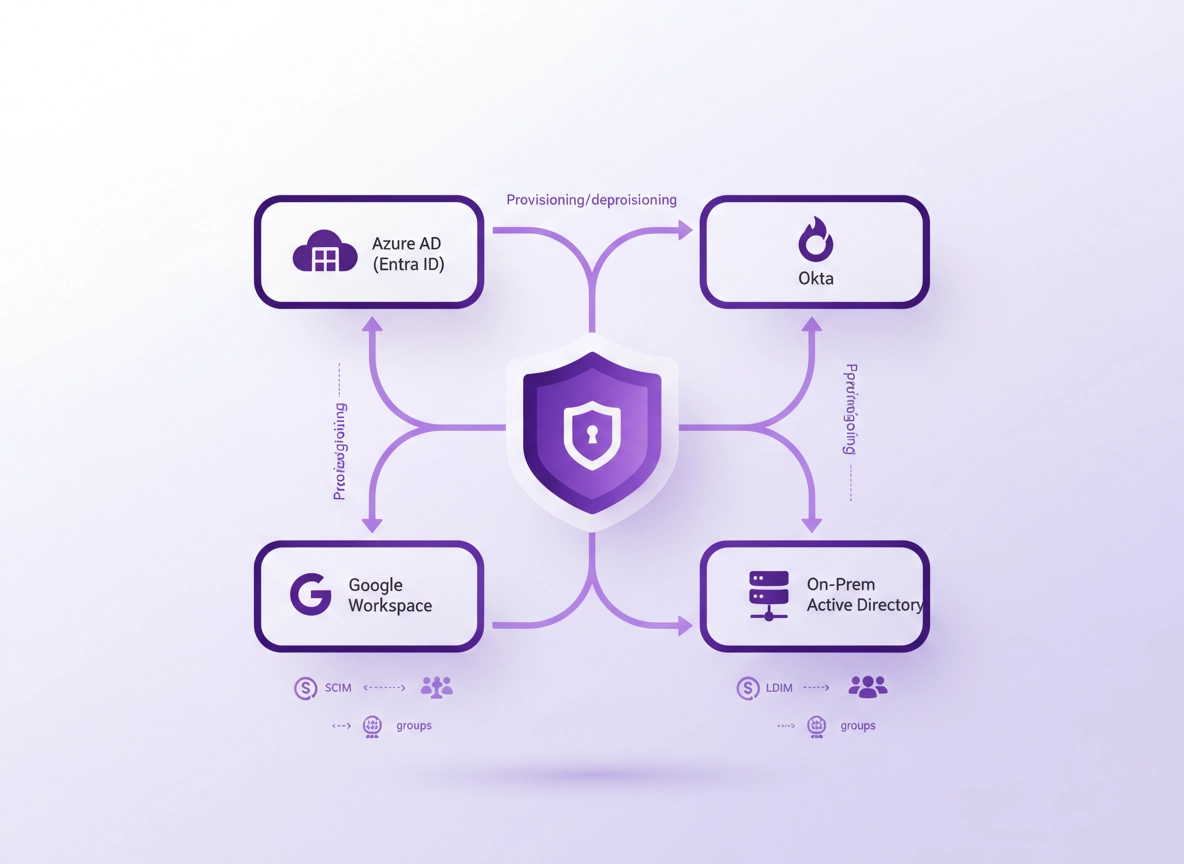
What directory integration is (and why it matters) .
Directory integration is about identity control and lifecycle automation — not just “making login easier”.
A password manager inside Chrome (usually as a browser extension + cloud vault) becomes a critical identity-adjacent system the moment your team starts storing shared credentials, API keys, customer logins, and admin accounts. Without directory integration, access is often managed through manual invites, ad-hoc team membership changes, and “someone please remove that old contractor” requests that happen far too late.
Directory integration connects your password manager to an identity provider (IdP) and/or a directory so users and groups are controlled centrally. Practically, it means: (1) users sign in with your corporate identity (SSO), (2) accounts are automatically created/updated/disabled via a provisioning standard such as SCIM, and (3) access to vaults, collections, folders, or shared items is driven by groups that already exist in your organization (e.g., “Finance”, “Engineering”, “Helpdesk”).
If you care about high-CPC, high-value enterprise intent: this is where the “real business” value lives. It’s not the password generator — it’s the ability to prove who had access, when, why, and what changed. That’s why directory integration is usually a paid feature in business/enterprise plans, and why it’s commonly evaluated alongside SSO, RBAC, and password policy enforcement.
Where this fits in your stack: Directory integration is one layer in an enterprise browser security model. If you’re also hardening Chrome, start with Chrome privacy settings and then move into Chrome Enterprise for managed-device controls.
Key terms (quick definitions) .
- Identity Provider (IdP): The system that authenticates users (e.g., Entra ID/Azure AD, Okta, Google Workspace). It issues tokens for SSO.
- Directory: The source of users and groups (e.g., Active Directory, LDAP, cloud directory). Often “the truth” for employment status.
- SSO (Single Sign-On): Users log in using corporate accounts (SAML or OIDC). Reduces password sprawl and centralizes MFA/conditional access.
- SCIM provisioning: A standard for creating/updating/deactivating accounts and group membership automatically in SaaS apps.
- Group-based access: Permissions to vaults/collections are assigned to groups (Finance/HR/IT), not individuals.
- JIT provisioning: “Just-in-time” user creation during SSO login. Useful, but often not enough for clean offboarding without SCIM.
- RBAC: Role-based access control for admin and management privileges inside the password manager.
Related: If you’re comparing Chrome’s built-in password features to dedicated vaults, see Chrome password manager vs third-party and Chrome’s built-in password manager review.
Before you start: pick your identity model .
The #1 reason directory integrations fail is not “the SCIM endpoint is down.” It’s choosing the wrong identity model up front: using JIT-only when you really needed lifecycle provisioning, syncing the wrong groups, or giving admins too much power without audit controls. The goal is to make access predictable, measurable, and reversible.
The recommended enterprise pattern .
- Sign-in: SSO (SAML or OIDC) from your IdP with MFA/Conditional Access.
- Lifecycle: SCIM provisioning for create/update/deactivate + group membership sync.
- Authorization: Group-based access control in the password manager (vaults/collections assigned to groups).
- Governance: RBAC (separate admin roles), audit logs, and approval workflow for sensitive sharing.
Fast checks (save yourself hours) .
- Decide what is the “source of truth” for users: Entra ID/Okta/Google Workspace, or AD synced to the cloud?
- Inventory your groups: Are they accurate and maintained? If group membership is messy, access will be messy.
- Confirm email uniqueness: Most SaaS provisioning keys on email/UPN. Duplicates cause ghost accounts.
- Define joiner/mover/leaver rules: What happens when someone changes teams? When does access change?
- Map the “break glass” path: If SSO or IdP is down, how do admins access the vault safely?
- Choose extension deployment: If this is managed Chrome, align with your rollout plan (see deployment guide below).
Related: If you’re deploying across managed devices, use Chrome password manager deployment guide. For enterprise Chrome controls, see Chrome Enterprise management.
What directory integration is not .
Directory integration is not simply “letting users log in with Google.” That’s SSO. Integration becomes meaningful when the IdP can also provision the account, assign the user to the correct teams, and remove access at the end of employment. Without lifecycle automation, organizations drift toward shared vault sprawl, orphaned access, and brittle admin workarounds.
Step-by-step: SSO + SCIM + groups (recommended) .
The following steps are vendor-neutral (they apply whether you use 1Password, Bitwarden, Dashlane, Keeper, NordPass, or similar business vaults). Specific menu labels differ, but the architecture is the same. If you want to compare popular options on Chrome, start with Best password manager for Chrome and the Chrome password manager comparison.
- 1 Pick your IdP: Choose the identity provider that will authenticate users (Entra ID/Azure AD, Okta, or Google Workspace). Confirm it’s your true source of identity.
- 2 Enable SSO in the password manager: In the admin console, configure SAML or OIDC, upload/enter the IdP metadata, and set a unique entity ID/ACS URL (SAML) or redirect URI (OIDC).
- 3 Enforce MFA centrally: Require MFA at the IdP layer (and optionally “step-up” authentication for privileged actions). This reduces reliance on the vault’s standalone MFA policies.
- 4 Turn on SCIM provisioning: Generate a SCIM token in the password manager admin portal and paste it into your IdP’s SCIM app. Set the base URL and test connectivity.
- 5 Define provisioning scope: Choose which users/groups are assigned to the password manager application in your IdP. Start with a pilot group (IT + Security) rather than “Everyone”.
- 6 Map attributes: Map email/UPN, display name, given name, surname, and (optionally) department/cost center. Keep mappings minimal to avoid sync churn.
- 7 Sync groups: Enable group push/sync so your IdP groups become teams/groups in the password manager. Use stable naming like
PM-Finance,PM-IT-Admins,PM-Helpdesk. - 8 Map groups to access: In the password manager, assign vaults/collections/folders to groups (not users). For example: Finance group → Finance vault; HR group → HR vault.
- 9 Set RBAC and admin separation: Limit who can change policies, export data, manage integrations, or recover accounts. (More on this in Advanced.)
- 10 Test joiner/mover/leaver: Create a test user, add to a group, verify access, then remove from the group and disable the user. Confirm access is revoked quickly and predictably.
- 11 Deploy the Chrome extension: Roll out the extension via Chrome enterprise policy or your MDM, then pin it and control permissions. Verify extension update behavior.
- 12 Audit and document: Record your group model, provisioning scope, and recovery path. This becomes your audit artifact and operational runbook.
What “success” looks like: New hires can sign in with SSO, are provisioned automatically, land in the correct vaults based on groups, and lose access promptly when disabled in the IdP — without manual invites or frantic “remove this person” tasks.
Related: If you’re specifically implementing SSO, see password manager single sign-on. If you’re defining admin roles and least privilege, see password manager RBAC.
Common variations (what changes by platform) .
- Windows / ChromeOS: Most enterprise rollouts use policy-based extension deployment and pinning. Consider restricting profile sign-in to corporate identities.
- macOS: Similar SSO/SCIM model, but device management might differ (Jamf/MDM). Ensure extension updates are not blocked by restrictive policies.
- Android / iPhone: Many password managers use a mobile app plus browser autofill. Directory integration still matters for lifecycle control, but “Chrome extension” becomes “managed app + autofill permissions.”
Advanced: AD/LDAP sync, role mapping, and separation of duties .
“Directory integration” can mean different things depending on where your identities live. In cloud-first environments, your IdP is the directory (Entra ID, Okta Universal Directory, Google Workspace). In hybrid environments, AD remains the system of record and feeds the cloud via sync. In legacy environments, direct LDAP integration may still be used for authentication or group membership reads — but it’s usually less flexible than SSO + SCIM in modern SaaS.
Related: If you’re integrating the browser itself with identity and policies, see Chrome Enterprise directory integration and Chrome Enterprise SSO configuration.
SSO vs SCIM vs LDAP: what each one is responsible for .
| Capability | SSO (SAML/OIDC) | SCIM Provisioning | LDAP/AD Sync |
|---|---|---|---|
| User authentication | Yes | No | Sometimes (legacy) |
| Account creation | Sometimes (JIT) | Yes (best) | Sometimes |
| Account disable/offboarding | Not reliably | Yes (best) | Sometimes |
| Group membership sync | No | Yes (best) | Yes (if supported) |
| Audit-friendly lifecycle | Partial | Strong | Varies |
If you take one thing from this section: SSO makes login consistent; SCIM makes access reliable. LDAP can still be relevant (especially for organizations with strict on-prem constraints), but it often lacks the clean lifecycle semantics that auditors and security teams prefer for SaaS systems.
Group design: the “least drama” model that scales .
Treat password-manager groups as access units, not HR labels. Your IdP might already have groups like “All Employees” or “Engineering” that are too broad. Create a dedicated set of app-scoped groups, then map them:
- PM-Finance: Finance vault + billing admin portals + bank integrations
- PM-IT-Helpdesk: Support credentials + device management consoles
- PM-Engineering-Prod: Production secrets (only for those who truly need it)
- PM-Sales-Tools: CRM and outreach tools (avoid over-sharing)
- PM-Security-Admins: Policy management + audit logs + integrations
RBAC and separation of duties (SoD) .
Directory integration reduces manual admin work — but it also increases the blast radius if an admin role is too powerful. The minimum governance model for a business vault usually includes:
- Provisioning admin: Can configure SCIM, manage IdP connections, and test sync — but can’t export vault data.
- Security admin: Can set policies (MFA requirements, sharing rules, device trust) and view audit logs.
- Vault admin / team admin: Can manage collections for a business unit (e.g., Finance), but not global security settings.
- Break-glass admin: An emergency role stored in a hardened path (hardware key + strict monitoring). Use rarely.
If you’re building this for enterprise environments, you’ll also care about: password managers for IT admins, enterprise password managers, and zero trust password manager patterns.
Attribute mapping: what’s worth syncing (and what isn’t) .
The temptation is to sync every attribute: department, title, office, manager, cost center, employee ID. In practice, more attributes mean more churn and more edge cases. For password managers, you typically need only:
- Immutable user ID key: Email/UPN (whatever your IdP uses as stable identifier)
- Name fields: Given + surname + display name (for usability)
- Status: Active/inactive and lifecycle events
- Groups: The main authorization lever
Operational rule: If changing an attribute could accidentally remove access or rename accounts, keep it out of SCIM mappings unless you have a strong reason.
Common alternatives users compare .
- Password manager vs built-in browser passwords (governance vs convenience)
- Password manager vs SSO (authentication vs secrets management)
- Chrome password manager vs enterprise solution (controls, auditability, lifecycle)
- Chrome password manager vs Bitwarden (example of business/enterprise comparison intent)
Security & compliance notes (audit-friendly) .
Directory integration directly affects your ability to satisfy common security requirements: least privilege, prompt access revocation, access reviews, and traceable change history. It also reduces operational risk: fewer manual invites and fewer “stale accounts” that persist long after someone leaves.
Impact: Changes who can sign in, how accounts are created/disabled, and how vault access is assigned. Done well, it reduces risk; done poorly, it can over-grant access.
Related: If your compliance target is GDPR/HIPAA/SOC 2, align directory integration with policy and auditing: GDPR, HIPAA, SOC 2.
Recommended baseline settings .
- Option A (balanced): SSO + MFA + SCIM for provisioning + group-based vault assignment + quarterly access reviews.
- Option B (maximum security): SSO with conditional access, SCIM with strict group scoping, admin separation (SoD), and restricted sharing/export policies.
- Option C (compatibility): SSO + JIT provisioning (temporary) while you prepare group hygiene, then move to SCIM once stable.
Recommended settings by goal .
| Goal | Recommended setting | Tradeoff | Best for |
|---|---|---|---|
| Balanced | SSO + SCIM + small set of app-scoped groups mapped to vaults | Requires initial group cleanup | Most organizations |
| Maximum security | SSO + Conditional Access + SCIM + SoD admin roles + strict sharing/export policies | More governance work up front | Regulated or high-risk teams |
| Compatibility | SSO + JIT provisioning (short term) + manual access mapping | Offboarding is less reliable without SCIM | Small teams transitioning to enterprise |
If your browser environment is also managed, combine directory integration with Chrome enterprise hardening so the extension runs in a controlled context. Useful references: Chrome enterprise security settings and secure configuration best practices.
Troubleshooting .
Related: If extension behavior is weird (missing autofill, prompts, or permissions), check Chrome extension security and extension permissions guide.
If users can sign in (SSO works) but access is wrong .
This is almost always a group mapping problem. Confirm the user is in the correct IdP group, then confirm that group is actually being pushed/synced into the password manager. Many orgs also accidentally assign the password manager app to “All Employees,” which creates accounts for everyone but does not give them meaningful access. Fix by scoping assignments to a pilot group and ensuring each vault/collection is mapped to a group explicitly.
- Fix: Verify IdP group membership → verify “group push/sync” is enabled → verify group exists in the password manager → verify vault/collection is assigned to that group.
- Pro tip: Add a “PM-Access-Base” group for baseline access (e.g., shared company logins) and keep privileged vaults separate.
If SCIM is connected but users aren’t provisioning .
Most SCIM provisioning failures come down to one of these: wrong base URL, expired token, user not assigned to the IdP app, or attribute mismatch (email/UPN not mapping cleanly). Check the IdP provisioning logs first; they usually show the exact error response.
- Fix: Re-check SCIM token and endpoint → confirm provisioning scope (assigned users/groups) → validate required attributes → run a “test provisioning” action.
- Pro tip: Start with one test user and one test group. Expand once you see predictable create/update/deactivate behavior.
If offboarding doesn’t revoke access fast enough .
SSO alone may let a user keep an active session longer than you’d like. SCIM deactivation should disable the account, but you also want session and device controls inside the password manager (and sometimes at the IdP) to shorten the window of access.
- Fix: Ensure SCIM deprovisioning is enabled → confirm the IdP “Disable user” triggers a SCIM deactivate → reduce session lifetimes for sensitive apps if your platform supports it.
- Pro tip: Maintain an emergency “offboarding runbook” for high-risk departures: disable IdP user, revoke tokens/sessions, rotate shared secrets, and verify audit logs.
If the Chrome extension is deployed but doesn’t work properly .
Managed Chrome environments can block extension capabilities if policies are too restrictive. Common issues: extension not pinned, permissions denied, third-party cookies blocked causing SSO loops, or profile sign-in conflicts.
- Fix: Confirm extension allowlist → pin extension → verify required permissions → test SSO in a clean profile → check cookie policies and sign-in settings.
- Related: Chrome enterprise extension management.
If you need to reset safely .
Avoid “nuke it from orbit” resets unless you know what data you’ll lose. For identity integrations, a safe reset means: remove the SCIM connection (or rotate the token), stop provisioning, clear failed group mappings, then re-enable provisioning with a pilot group.
- Safe reset flow: Pause provisioning → rotate SCIM token → remove incorrect group mappings → run pilot provisioning again → expand scope.
- Security note: Token rotation is not optional after an admin departure or suspected compromise.
FAQ .
-
helpDo I need SCIM if I already have SSO?SSO handles authentication, but SCIM handles lifecycle. Without SCIM, you often rely on manual invites or JIT provisioning, and offboarding can be inconsistent. If you care about reliable deprovisioning, group-based access, and audit-friendly change history, SCIM is the upgrade that makes identity “operational.”
-
helpWhat’s the safest way to use groups for vault access?Use app-scoped groups (e.g., PM-Finance, PM-IT-Helpdesk) rather than org-chart groups. Keep the number of groups small and map each group to a vault/collection. Review group membership quarterly, and avoid assigning privileged vaults to broad groups like “All Employees.”
-
helpCan I integrate Active Directory directly (LDAP) instead of an IdP?Some platforms support LDAP/AD sync, especially in hybrid environments. However, the most reliable modern pattern is to connect an IdP (like Entra ID or Okta) for SSO and use SCIM for provisioning. LDAP can work, but it may be less flexible for SaaS lifecycle automation and group push semantics.
-
helpHow does directory integration help with compliance (SOC 2, HIPAA, GDPR)?It strengthens access control by tying vault membership to centrally managed identity and groups, improves offboarding by disabling access quickly, and supports audit evidence through consistent provisioning logs and role controls. It’s one of the most practical steps toward least privilege and demonstrable access governance.
Sources & further reading .
- SCIM Protocol (RFC 7642): provisioning standard overview
- SCIM Core Schema (RFC 7643): user/group schema concepts
- Okta: identity and lifecycle management concepts
Disclosure: Some pages may mention tools or services. Recommendations are editorial and based on practical implementation patterns and security outcomes.