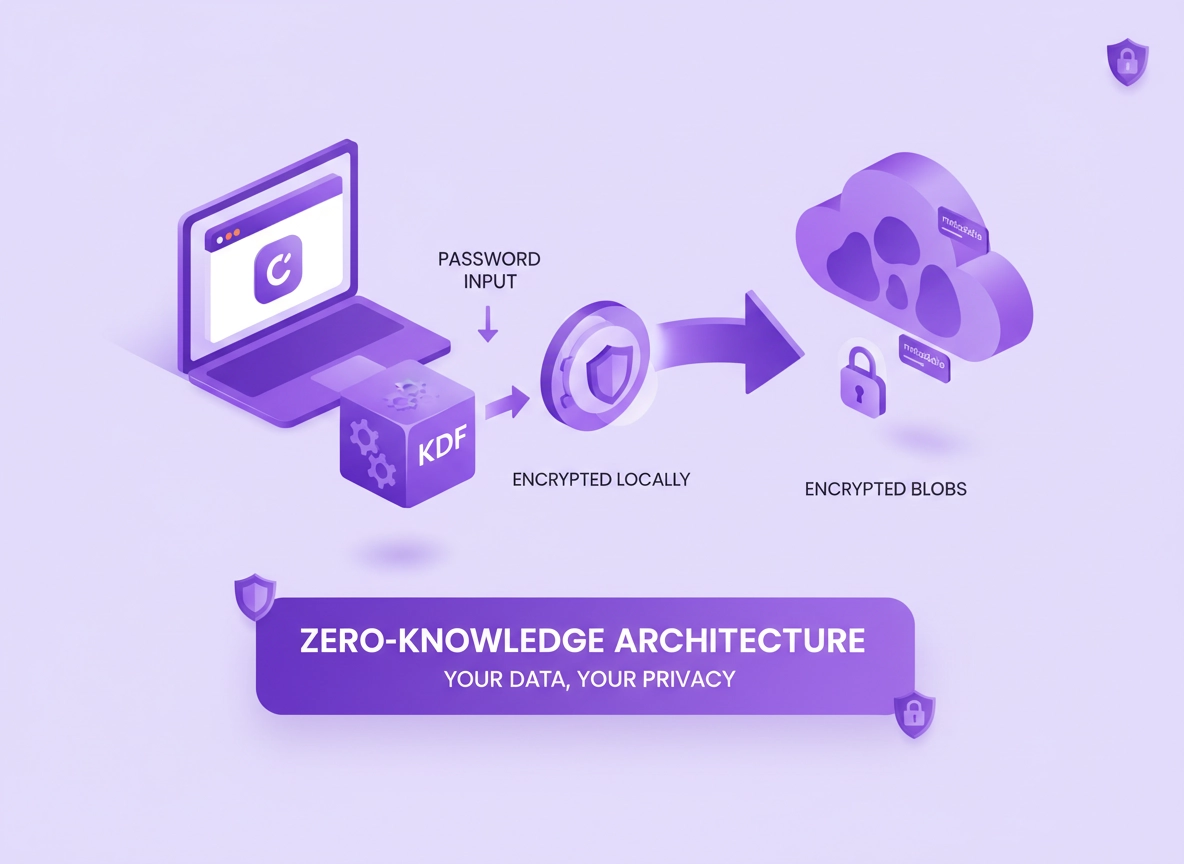
What “zero-knowledge” means (and what it doesn’t) .
Zero-knowledge is an architecture goal, not a magic word. The details are the product.
In password manager marketing, “zero-knowledge” usually means the provider’s servers are designed so they cannot decrypt your vault contents (passwords, notes, card details, file attachments) because the decryption keys are derived on your device from secrets the provider does not possess—typically your master password and optionally a second secret (a “secret key” or device-bound key).
That design goal matters because the most common catastrophic event for a cloud password manager is a server-side breach: someone steals vault data at rest. If vaults are encrypted client-side with strong key derivation, the attacker’s problem becomes an offline cracking problem (guessing your master password) rather than instantly reading everything.
But “zero-knowledge” does not mean “zero data.” Providers can still log account activity, enforce billing, detect abuse, and sync devices. That requires some metadata. The mature way to read the term is: the provider cannot read secrets, but may still see metadata that supports the service.
Related: For a plain-English explanation of vault encryption, read Password manager encryption explained, and for buyer intent, see Best password manager for Chrome.
Key terms (quick definitions) .
- Client-side encryption: Encryption happens on your device before sync; the server stores only ciphertext.
- Master password: The primary secret you know; used to unlock vault keys (and should never be sent in plaintext).
- KDF (Key Derivation Function): A “slow” algorithm (Argon2id/scrypt/PBKDF2) that turns a password into a cryptographic key while resisting brute force.
- Vault key / encryption key: The actual symmetric key used to encrypt your vault items; typically wrapped (“encrypted”) by a key derived from your master password.
- PAKE / SRP: Authentication protocols that can prove you know a password without sending it; can reduce exposure during login.
- Metadata: Non-secret data like account identifier, device list, timestamps, IP logs, vault size, item counts, or folder names (varies by product).
Before you start: the threat model in 60 seconds .
“Is zero-knowledge worth it?” depends on what you’re trying to protect against. Here are the threats that matter most for Chrome users and teams:
- Provider breach (server data stolen): Zero-knowledge primarily reduces impact here—if your master password is strong and KDF settings are robust.
- Device compromise (malware, infostealers): Zero-knowledge helps less. If your device is infected, attackers may steal your unlocked session or capture keystrokes.
- Phishing / credential reuse: A good password manager helps by generating unique passwords and supporting passkeys/2FA.
- Browser extension risk: Password manager extensions are powerful by design. You must treat extension permissions and update behavior as part of security.
- Human error: Shared vault mistakes, overbroad access, weak master passwords, and risky recovery choices can undo “zero-knowledge” benefits.
Related: If you’re comparing the built-in option, start with Chrome’s built-in password manager review, then read Chrome password manager vs third-party.
How zero-knowledge architecture works (step-by-step) .
Most modern zero-knowledge password managers follow a similar pattern. The names vary, but the flow is consistent because it’s the easiest way to scale sync while keeping decryption client-side.
The core flow: create keys, encrypt locally, sync ciphertext .
- 1 Master password chosen: You create a master password (and sometimes a second secret like a “secret key”).
- 2 KDF runs on your device: The app derives a key from your master password using a slow KDF + unique salt.
- 3 Vault key created: The app creates a random symmetric vault key (the key that will actually encrypt data).
- 4 Vault key wrapped: The vault key is encrypted (“wrapped”) by the KDF-derived key and stored as an encrypted blob on the server.
- 5 Items encrypted locally: Each password/secret is encrypted on your device using the vault key (often per-item subkeys / IVs).
- 6 Only ciphertext syncs: The server stores and syncs encrypted vault items and the wrapped vault key to your devices.
- 7 Unlock = decrypt locally: When you unlock, your device re-runs the KDF, unwraps the vault key, then decrypts items locally.
What “success” looks like: If the provider is breached, the attacker should get encrypted vault data that is computationally expensive to crack—assuming you chose a strong master password and the product uses a modern KDF with sensible cost settings.
Why there’s a vault key at all .
Encrypting every item directly with a key derived from your master password would force a heavy KDF on every encrypt/decrypt operation and complicate rekeying. A random vault key is fast for daily crypto, and you can rotate or rewrap it when policies change (for example, upgrading KDF parameters or adding a second factor).
Crypto details that matter: KDFs, encryption, and authentication .
You don’t need to be a cryptographer to make a good decision, but you do need to know which technical details actually change risk. Here are the big ones.
1) KDF choice + cost parameters (this is your offline-crack resistance) .
If an attacker steals encrypted vault data, their best option is often offline guessing of your master password. The KDF is what makes each guess expensive. Strong modern KDFs are intentionally slow and (ideally) memory-hard so GPUs/ASICs don’t dominate as easily.
- Argon2id: Considered a top modern choice; reputable guidance suggests minimum memory + iteration baselines (and products may go higher). :contentReference[oaicite:2]{index=2}
- scrypt: A widely used memory-hard alternative when Argon2id isn’t available. :contentReference[oaicite:3]{index=3}
- PBKDF2: Common and supported almost everywhere, but not memory-hard; it can still be acceptable with high iteration counts and strong master passwords. :contentReference[oaicite:4]{index=4}
What to look for: The product should clearly document the KDF used, the default cost settings, and whether those settings are upgradeable. If it’s hidden or vague, treat “zero-knowledge” as unverified.
2) Encryption mode and integrity (confidentiality without tamper is incomplete) .
Most vault encryption is symmetric (e.g., AES). The important part is not just confidentiality (“can’t read”) but integrity (“can’t silently alter”). That’s typically handled with AEAD modes (like AES-GCM) or an encrypt-then-MAC construction.
Modern web and app platforms commonly rely on the Web Crypto APIs to implement primitives safely rather than rolling custom JavaScript crypto. :contentReference[oaicite:5]{index=5}
3) Authentication that doesn’t leak password equivalents .
A strong zero-knowledge design avoids sending the master password (or a reusable “password equivalent”) to the server. Some designs use password-authenticated key exchange (PAKE) methods—like SRP—so the client can prove knowledge of the password without transmitting it. SRP is a well-known PAKE design in this space. :contentReference[oaicite:6]{index=6}
Even without PAKE, many products store only a verifier that is resistant to offline attacks when properly salted and derived using a suitable KDF. NIST’s digital identity guidance emphasizes salted, one-way derivation for stored verifiers. :contentReference[oaicite:7]{index=7}
4) Key lifecycle on devices (the part “zero-knowledge” marketing underplays) .
The vault is decrypted on your device—so if your device is compromised while the vault is unlocked, attackers can potentially extract secrets. Practical controls that reduce risk include:
- Short unlock windows (auto-lock) and per-device unlock policies
- Biometric unlock (as convenience) with the master password still required periodically
- Hardware-backed key storage where available (platform keystores)
- Strong 2FA/passkeys for account access and new device approvals
- Browser extension hardening (least permissions, trusted update channels)
Related: If you’re thinking “what could go wrong,” read password manager hacking risks and password manager vulnerability risks.
How to evaluate zero-knowledge claims (vendor checklist) .
Use this checklist like an interview script. You’re looking for clear documentation and a design that holds up even if you assume the server is breached.
Core architecture questions .
- What is encrypted client-side? Vault items, notes, attachments, usernames, URLs, folder names, tags—ask specifically.
- What metadata is not encrypted? Device list, vault size, timestamps, IP logs, billing identity, sharing graphs, item counts.
- What KDF is used? Argon2id / scrypt / PBKDF2. Request defaults and whether users/admins can tune cost.
- How are keys stored on device? Platform keystore? Encrypted local storage? Any “remember me” tradeoffs?
- Is there independent auditing? Look for third-party security assessments and public write-ups.
Sharing and collaboration questions .
Sharing is where “zero-knowledge” gets real. Sharing requires key distribution: either the sender encrypts a copy of the vault key to recipients, or the product uses per-item keys and group keys. Ask:
- How does sharing work cryptographically? Per-item keys, team keys, or re-encryption on the client?
- Can an admin recover user vaults? If yes, how is that implemented—and is it optional?
- Do permissions enforce least privilege? Read-only, view-only, “can fill but not view,” etc.
Related: If you’re planning a team rollout, read password manager for IT admins and RBAC for password managers.
Account recovery questions (the “zero-knowledge tax”) .
Real zero-knowledge means the provider can’t reset your vault without your help—because they don’t have the keys. Recovery features are possible, but they always introduce tradeoffs.
- Recovery key / emergency kit: You store a high-entropy recovery secret offline. Strong, but user-dependent.
- Emergency access: A pre-approved trusted contact can gain access after a delay window. Useful, but governance matters.
- Enterprise recovery: Some business products allow admin-assisted recovery (often with escrowed keys). This can conflict with strict zero-knowledge.
Enterprise reality: SSO, RBAC, recovery, and admin controls .
In business environments, password managers become identity infrastructure. The hard part is balancing: zero-knowledge secrecy, centralized access control, and operational recovery.
SSO and directory integration: what changes .
Single sign-on (SSO) can make onboarding clean, but it doesn’t automatically replace vault encryption. You still need a mechanism for vault keys. Depending on the product:
- SSO may control account access while vault keys remain tied to a master password or device secret.
- Some products support “SSO unlock” patterns that shift trust to the identity provider and may add recovery/escrow mechanisms.
- Directory integration (e.g., SCIM) is about user lifecycle, not encryption—but it affects offboarding risk.
Related: For enterprise planning, see password manager SSO and directory integration for password managers.
RBAC: protecting secrets inside the company .
Zero-knowledge doesn’t stop internal over-sharing. RBAC is how you avoid “everyone can see everything.” For mature teams, aim for:
- Role-scoped vaults (finance, IT, legal) and per-app secrets rather than a giant shared vault
- Just-in-time access for sensitive credentials (where supported)
- Audit trails that show access events without exposing secret content
- Offboarding guarantees (revocation and rekeying workflows)
Common alternatives users compare .
Privacy & security notes .
Zero-knowledge mostly protects vault content at rest on the provider’s servers. Your real-world security is the combination of vault crypto, your master password strength, device security, and browser integration.
Impact: Primarily reduces breach impact (server-side theft). Less effective against device malware, session hijacking, and risky sharing practices.
Related: If you suspect infection or hijacking, see Remove Malware from Chrome and Chrome extension security check.
Recommended baseline settings .
- Option A (balanced): Strong master password + 2FA/passkeys + auto-lock + approved devices only.
- Option B (maximum privacy): Strong master password + high KDF cost (if configurable) + minimal metadata / privacy-respecting logs + strict device posture.
- Option C (compatibility): Keep auto-fill on trusted sites, limit “all sites” extension access, and use separate Chrome profiles for work vs personal.
Recommended settings by goal .
| Goal | Recommended setting | Tradeoff | Best for |
|---|---|---|---|
| Balanced | Enable 2FA + auto-lock (5–15 min) + approve new devices | Slightly more friction | Most users |
| Maximum privacy | Prefer audited zero-knowledge designs + higher KDF cost (when available) + separate profiles | Slower unlocks, more setup | High-risk roles |
| Compatibility | Limit extension access to “on click” or specific sites + keep recovery options documented | More manual fills | Banking / enterprise apps |
Also useful: Master password security, data breach protection, and Chrome password manager security risks.
Troubleshooting: common misunderstandings .
“Zero-knowledge means the provider can’t help me recover my vault” .
Often true in strict designs. If the provider doesn’t have your decryption key material, they can’t “reset” the vault. Recovery is possible via user-held recovery keys, emergency access, or enterprise key escrow—but those are explicit tradeoffs. If a product promises effortless recovery with no user-held secret, ask how that’s implemented.
“If it’s zero-knowledge, I don’t need a strong master password” .
Not true. In a breach scenario, attackers may attempt offline guesses. The KDF helps, but a weak master password can still fall. Treat your master password like a root key: unique, long, and not reused anywhere else.
“AES-256 means I’m safe” .
Encryption strength depends on key handling. Strong algorithms with weak key derivation, poor randomness, or bad device storage can fail. Prefer well-documented designs and independent auditing.
“Browser extensions are safe because they’re from the password manager” .
A password manager extension must read page context to fill forms. That’s powerful. Reduce risk by limiting extension permissions, using trusted devices, and keeping Chrome updated. If you manage fleets, enforce policies and consider hardened profiles.
Related: For Chrome-side hygiene, start with Chrome Security Checkup and Chrome password leak detection.
FAQ .
-
helpIs a zero-knowledge password manager “end-to-end encrypted”?Usually yes in the practical sense: your vault contents are encrypted on your device and decrypted only on your devices. But E2EE can be implemented in different ways (especially for sharing), so you should check what fields are encrypted and how keys are distributed for team vaults.
-
helpWhat data can a “zero-knowledge” provider still see?Typically some service metadata: account identifiers, billing, device lists, timestamps, IP logs, vault size, and sync events. Good vendors publish a privacy/security model that clearly lists what is encrypted vs what is collected for operations.
-
helpDoes zero-knowledge protect me if my laptop is infected?Not reliably. If malware runs on a device while your vault is unlocked, it may steal session tokens, capture keystrokes, or exfiltrate decrypted secrets. Zero-knowledge is strongest against server-side compromise; device security still matters.
-
helpHow do I verify a product’s zero-knowledge claim without reading code?Look for a detailed security whitepaper: KDF used (Argon2id/scrypt/PBKDF2), default cost settings, client-side encryption flow, sharing key model, and independent audits. If documentation is vague (“AES-256, trust us”), treat the claim as unverified.
Sources & further reading .
- OWASP: Password Storage Cheat Sheet (KDF guidance)
- NIST SP 800-63B: Digital Identity Guidelines (verifier storage, salted KDFs)
- W3C: Web Cryptography API (spec)
- MDN: Web Crypto API overview
- Cryptologie: What’s SRP? (PAKE overview)
Disclosure: Some pages may mention tools or services. Recommendations are editorial and based on testing and documentation review.