What “enterprise password manager” means for Chrome .
This is a buyer’s guide for organizations — not a “best free vault” list.
An enterprise password manager for Chrome is a password vault and sharing system designed to work at scale across managed browsers, devices, and teams. In consumer password managers, the core promise is simple: generate strong passwords, store them securely, and autofill in Chrome. In enterprise password management, the vault is only the start.
Enterprise-grade tools must answer the questions that become painful at 50, 500, or 5,000 users: Who can access what? How do you enforce least privilege? How do you onboard/offboard users automatically? Can you integrate with your identity provider and security monitoring? Can you prove control to auditors? Can you recover access without turning recovery into a backdoor?
The “best” option isn’t one brand — it’s the tool that matches your org’s reality: whether you’re fully cloud-first with SSO everywhere, whether you have contractors rotating weekly, whether you need strict approval workflows for shared vaults, or whether you need detailed event logs to satisfy SOC 2 / ISO-style audits.
Related: If you’re deciding between Chrome’s built-in vault vs a dedicated solution, start here: Chrome built-in password manager review and Chrome password manager vs third-party.
Key terms (quick definitions) .
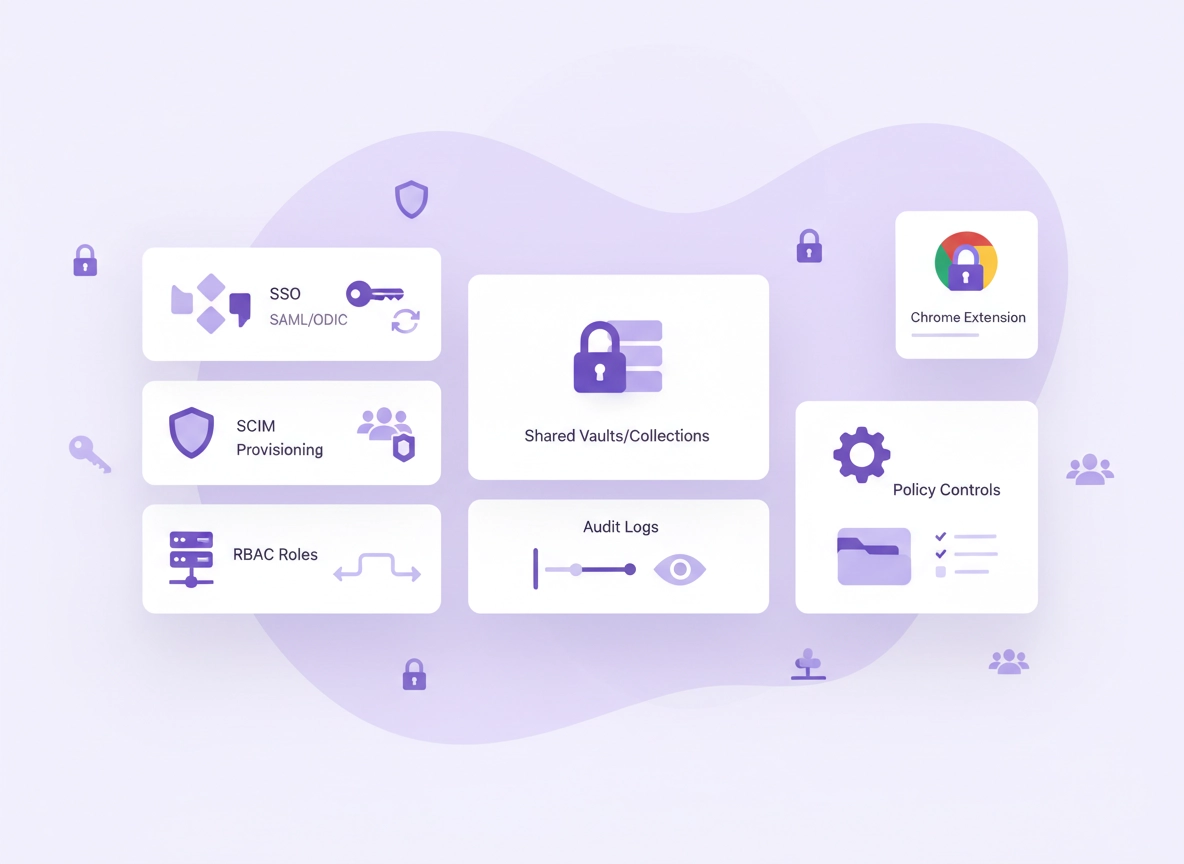
- SSO (SAML / OIDC): A sign-in method that lets users authenticate via your identity provider (IdP) instead of local vault passwords.
- SCIM provisioning: Automated user lifecycle: create, update, disable, and group users in the vault based on your IdP directory.
- RBAC (role-based access control): Assign roles (admin, manager, auditor, user) and restrict actions (sharing, exports, recovery).
- Shared vaults / collections: A controlled way to share credentials with teams without copy/paste chaos.
- Zero-knowledge encryption: A design where the vendor cannot read your vault contents (but still confirm what recovery implies).
- Audit logs: Event records of actions like view/copy/export/share/revoke; should be exportable and ideally streamable to SIEM.
- Emergency access / recovery: A method to regain access if a user is locked out — powerful, and risky if not controlled.
Before you start: define requirements (fast checks) .
Most “best enterprise password manager” decisions go wrong because the team starts with vendors instead of requirements. Fix that first. In a single page, write down the answers below. You’ll instantly eliminate options that look good on marketing pages but fail in your environment.
- Identity: Which IdP do you use (or plan to use)? Do you require SSO for all users? Any conditional access policies?
- User lifecycle: Do you need SCIM? How fast must access be removed after termination (minutes, hours, days)?
- Sharing model: Do teams share “department vaults,” or do you need per-credential approvals? How many shared items per team?
- Admin boundaries: Should admins be able to reset access or never see secrets? Who is allowed to recover users?
- Logging: Do you need audit logs for compliance? Do you need export/retention? SIEM streaming?
- Browser reality: Are your users primarily in Chrome? Are devices managed (MDM, Group Policy, Chrome Enterprise policies)?
- Scope: Passwords only, or also secure notes, API keys, SSH keys, certificates, and secrets used by developers?
Related: If you’re doing this for a business rollout, these pages help frame requirements: password manager for Chrome business, enterprise password manager (Chrome) overview, and password policy for Chrome enterprise.
Now run these three “fast checks” before you schedule demos:
- Fast check 1 (SSO enforcement): Can you require SSO for all users and block local password logins (or at least strongly discourage them)?
- Fast check 2 (offboarding reality): Does disabling a user immediately remove access to shared vaults and stop autofill in Chrome?
- Fast check 3 (sharing control): Can users share credentials only via managed collections (not via copy/paste, plaintext exports, or uncontrolled “shares”)?
Step-by-step: how to evaluate in under 2 hours .
You don’t need a 6-week “bake-off” to find the best enterprise password manager for Chrome. You need a structured pilot that matches how people actually use Chrome: sign in, autofill, share, rotate, recover, offboard. Here’s a tight evaluation process that produces a confident decision quickly.
- 1 Pick 2–3 finalists based on requirements (not hype). Only include options that support your SSO method and (if required) SCIM provisioning.
- 2 Set up a pilot tenant with real roles. Create at least: one super admin, one security/auditor role, one team manager, and 5–10 normal users.
- 3 Install the Chrome extension the way you’ll deploy it. If you manage Chrome, test via policy/MDM deployment (not manual install) to mirror reality.
- 4 Validate core Chrome workflows. Test login capture, autofill reliability, passkey behavior (if relevant), and what happens on complex enterprise login flows.
- 5 Test sharing under policy. Create a “Finance” shared vault with 10 credentials. Validate: who can view, who can edit, who can share onward, who can export, who can see history.
- 6 Test lifecycle automation. Provision users via SCIM (or your chosen method). Disable a user and confirm access disappears immediately.
- 7 Test audit logs like an auditor. Find “who accessed X,” “who exported,” “who changed a vault item,” and confirm exports/retention meet policy.
- 8 Test recovery without creating a backdoor. Validate your recovery model: emergency access, admin-assisted recovery, or hardware-key recovery. Confirm you can lock it down.
- 9 Do a 15-minute security review. Confirm encryption model, key management assumptions, and admin boundaries. Document what you trust and what you’re delegating.
- 10 Score it using the scorecard below. Decide with evidence, not opinion.
What “success” looks like: Users sign in once (SSO), the Chrome extension behaves predictably, shared vault access is controlled and auditable, disabling a user immediately cuts access, and the admin team can prove who accessed what without reading secrets.
Related: If your team is remote/distributed and sharing is your biggest risk, read password manager for Chrome remote teams and password sharing securely in Chrome.
Common variations (where pilots fail) .
- Windows / ChromeOS: Policy deployment is usually easiest here; confirm the extension is forced-installed and cannot be removed.
- macOS: Validate the extension + desktop app relationship (if applicable), and confirm browser permissions prompts don’t break rollout.
- Android / iPhone: Mobile autofill is not “Chrome extension autofill.” Treat mobile separately if your org relies on it heavily.
The enterprise scorecard (copy/paste) .
This is the part most buyers wish they had at the start: a practical scorecard that matches enterprise reality. Copy this into a doc and score each finalist from 0–3 (0 = fails, 1 = partial, 2 = meets, 3 = excellent). The highest total isn’t automatically “best,” but it forces clarity and reveals dealbreakers.
| Category | What to verify | Why it matters | Score (0–3) |
|---|---|---|---|
| SSO enforcement | SAML/OIDC support, forced SSO, conditional access alignment | Reduces credential sprawl and password reset risk | |
| SCIM lifecycle | Provisioning, groups, disable/delete behavior, role mapping | Offboarding becomes instant and reliable | |
| RBAC | Granular roles (admin/auditor/manager), least privilege | Prevents overpowered admins and internal misuse | |
| Sharing controls | Collections/vault policies, prevent re-sharing, restrict export | Stops “one click share to anyone” mistakes | |
| Audit logs | View/copy/export events, retention, exportability, integrity | Required for investigations and compliance | |
| Admin boundaries | Can admins read secrets? Can you separate duties? | Minimizes insider risk and supports compliance | |
| Recovery model | Emergency access, admin recovery, key escrow assumptions | Recovery is necessary — and dangerous if weak | |
| Chrome extension UX | Autofill reliability, login capture, permissions, stability | If UX fails, users will bypass it | |
| Security architecture | Encryption model, key management, threat model clarity | Defines what the vendor can and cannot access | |
| Integrations | Directory, SIEM, ticketing, DLP, device trust | Enterprise tooling should connect, not isolate | |
| Reporting | Password health, reused/weak, coverage metrics | Shows progress and risk reduction over time | |
| Licensing & rollout | Minimums, guest/contractor handling, admin pricing | Prevents “surprise cost” after pilot success |
Advanced buyer considerations (security, identity, compliance) .
Enterprise password management is ultimately a trust and control decision. “Secure” is not just encryption — it’s controls that prevent mistakes, detect misuse, and allow fast containment. Below are the high-value considerations that separate “works for teams” from “works for enterprises.”
Related: If your organization is formalizing security controls across Chrome, these pages pair well with this guide: Chrome managed browser security, Chrome enterprise threat protection, and Chrome corporate security guide.
1) Identity integration is the foundation .
If your password manager is not tied tightly to identity, you’ll end up with “two accounts” per user: their company identity and their vault identity. That leads to inconsistent access control and messy offboarding. At enterprise scale, your IdP should be the source of truth.
- SSO: Validate if the solution supports the exact methods you use and whether it can enforce SSO.
- SCIM: Validate group mapping and what happens when a user is disabled (not just deleted).
- Device trust: If your org uses device compliance, validate whether the password manager respects those checks.
2) Sharing is where most leaks happen .
In the real world, password leaks are rarely “hacked vaults.” They’re shared credentials spread across chats, documents, spreadsheets, or emailed to contractors. The best enterprise password manager for Chrome makes secure sharing easier than insecure sharing.
- Managed collections: Users share into collections with policies, not one-off “shares” you can’t track.
- Least privilege: Separate “can view” from “can edit” from “can share onward” from “can export.”
- Rotation workflow: When someone leaves, rotate shared secrets. Validate the tool supports real rotation habits.
Related: If your pain point is sharing and access hygiene, read password security audit, password breach monitoring, and password health check.
3) “Zero-knowledge” is useful — but confirm what it means operationally .
“Zero-knowledge encryption” is often used as a trust signal: the vendor cannot read your secrets. That’s a meaningful property, but it doesn’t automatically solve enterprise questions: How do you recover access? How do you prevent risky exports? How do you audit “who accessed what” without seeing the content?
- Ask: Can admins reset a user without seeing secrets? If yes, what’s the recovery mechanism?
- Ask: What is logged? Viewing vs copying vs exporting matters.
- Validate: Whether the design fits your compliance posture (especially around recovery and admin actions).
4) Audit logs must be usable, not just “available” .
Audit logs are only valuable if your team can answer questions fast during an incident: “Did anyone export secrets?” “Who accessed the production credentials?” “When did access change?” The best tools make these answers obvious and exportable.
- Event quality: Look for per-item access events, not only “user logged in.”
- Retention: Validate how long logs are kept and whether you can export them for longer retention.
- Integrations: If you operate a SIEM, confirm whether logs can be streamed or regularly exported.
Common alternatives buyers compare .
- Chrome built-in vault vs enterprise password managers
- Chrome password manager comparison (feature-level) vs enterprise readiness
- Password manager with 2FA vs SSO-first enterprise access
- Open-source password manager vs managed enterprise platforms
Chrome deployment & policy rollout (IT playbook) .
A password manager can be “the best” on paper and still fail in the field if deployment is messy. Enterprise rollouts succeed when the Chrome extension is installed consistently, sign-in is standardized, and users are guided into secure sharing habits from day one.
Rollout sequence that works .
- Week 0: Prepare identity. Configure SSO, enable SCIM, define groups/roles, and decide who owns recovery.
- Week 1: Pilot with real teams. Use teams that share credentials daily (IT + Finance + Ops). Validate sharing under policy.
- Week 2: Force-install extension. Deploy via managed Chrome where possible. Keep manual installs as a backup only.
- Week 3: Migrate and standardize. Import credentials carefully. Create shared vaults and remove credentials from docs/chats.
- Week 4: Measure and tighten. Turn on advanced controls (export restrictions, sharing approvals, stronger recovery constraints).
Chrome-specific deployment checks .
- Extension permissions: Confirm what “read and change site data” is required for and whether it can be limited. If your org is sensitive to permissions, document the rationale.
- Profile behavior: Decide whether users can use personal Chrome profiles. Mixed personal/work profiles are a common failure mode.
- Autofill collisions: If Chrome’s built-in password manager is enabled, you may see double prompts and confusion. Plan the transition explicitly.
Related: If you need help thinking about Chrome policies and enterprise settings around access control, see Chrome IT admin security settings and Chrome security policy setup.
Privacy & security notes (what to validate) .
Enterprise password managers touch your highest-value assets: identities, admin consoles, finance platforms, production systems. The goal is not “perfect security.” The goal is a system that materially reduces risk, prevents predictable mistakes, and makes investigations possible when something goes wrong.
Impact: Affects credential confidentiality, account takeover resistance, recovery controls, and audit readiness.
Related: If you suspect credential theft or malicious extension behavior, review Chrome password leak detection and Chrome extension security check.
Recommended baseline controls .
- Option A (balanced): SSO required, SCIM enabled, RBAC roles defined, shared vaults required for team credentials, audit logs retained/exported.
- Option B (maximum security): Restrict exports, require approvals for sensitive shares, enforce hardware-key MFA for admins, tighten recovery controls, stream logs to SIEM.
- Option C (compatibility-first): Keep controls lighter during migration, but still enforce SSO and implement shared vaults early to prevent “shadow sharing.”
Recommended settings by goal .
| Goal | Recommended controls | Tradeoff | Best for |
|---|---|---|---|
| Balanced | SSO + SCIM + RBAC, shared vaults, audit logs export | Slightly more setup time | Most organizations |
| Maximum security | Export restrictions, approvals, hardened admin MFA, tighter recovery | More friction for edge cases | High-risk teams, regulated orgs |
| Compatibility | Phased rollout, preserve some flexibility while migrating | Longer period of mixed behavior | Large orgs migrating from chaos |
Troubleshooting (common Chrome + admin issues) .
Related: If you’re troubleshooting autofill and browser behavior specifically, also see password autofill Chrome extension and secure password storage in Chrome.
If users keep saving passwords to Chrome instead of the enterprise vault .
This is common during migration. Users see Chrome prompts and default to what they know. Fix it by explicitly planning the handoff: train users to save in the enterprise tool, and reduce prompt collisions. In managed environments, consider policies that reduce Chrome’s built-in password prompts during rollout. (Don’t do this blindly — confirm the impact and keep a rollback plan.)
If autofill is inconsistent on certain enterprise login pages .
Many enterprise login flows use iframes, step-based screens, and embedded identity widgets. In a pilot, test the top 20 sites your org uses daily (IdP portal, email, HR, finance, cloud consoles). If autofill fails, confirm whether the tool supports custom field matching, multiple URLs per entry, and whether users can safely “copy to clipboard” with clipboard timeout controls.
If offboarding doesn’t immediately remove access .
This usually happens when the vault account isn’t tied to SCIM, or when users also have personal accounts. Validate SCIM group mapping, confirm the disable action actually revokes vault access, and confirm the Chrome extension cannot remain signed-in with cached tokens after termination. In high-risk roles, require short session lifetimes and re-authentication for sensitive actions.
If admins can’t answer “who accessed this credential?” .
“Audit logs exist” is not enough. You need item-level events. During evaluation, simulate a mini incident: one user views a credential, another copies it, another exports a vault. If logs don’t clearly show those actions, the tool will underperform when you need it most.
If the Chrome extension is blocked or removed unexpectedly .
In managed Chrome, extension allowlists/blocklists are common. Confirm the extension ID is allowlisted, and deploy via policy as a force-install where appropriate. If you suspect extension policy conflicts, review Chrome extension installation policy and extension allowlist policy.
FAQ .
-
helpWhat makes a password manager “enterprise” for Chrome?Enterprise tools add identity integration (SSO), automated lifecycle management (SCIM), granular roles (RBAC), controlled sharing, and audit logs that support investigations. The Chrome extension matters too: it must be deployable by policy, stable at scale, and predictable for users.
-
helpIs Chrome’s built-in password manager good enough for business?For small teams, it can be “good enough” for basic storage and autofill. But it typically lacks the enterprise controls buyers need: granular RBAC, sharing approvals, strong audit logs, controlled recovery, and clean offboarding workflows. If you need compliance reporting or strict access control, a dedicated enterprise solution is usually the safer path.
-
helpWhat are the top dealbreakers to watch for?The biggest dealbreakers are: weak or missing SSO enforcement, no SCIM (if you need it), limited audit logs, poor sharing controls (especially re-sharing and exports), and a recovery model that effectively creates an admin backdoor. Also watch Chrome extension reliability — if users don’t trust autofill, they will bypass the tool.
-
helpHow do we roll out an enterprise password manager without hurting productivity?Start with a pilot team that shares credentials daily. Use SSO from day one, create shared vaults with clear owners, and run a phased migration. Keep policies “usable and safe” at first, then tighten controls after adoption stabilizes. Measure progress using password health and coverage reports, and remove credentials from docs/chats as you migrate.
Sources & further reading .
- Google Chrome Help Center
- Chrome Enterprise & Education Help
- OWASP Top 10 (risk context for credential misuse)
- NIST guidance (identity, security controls, and risk management)
Disclosure: ChromeThemer publishes editorial guides and comparisons. If tools or services are mentioned elsewhere on the site, recommendations are based on practical criteria and buyer relevance (Chrome compatibility, enterprise controls, and security posture).