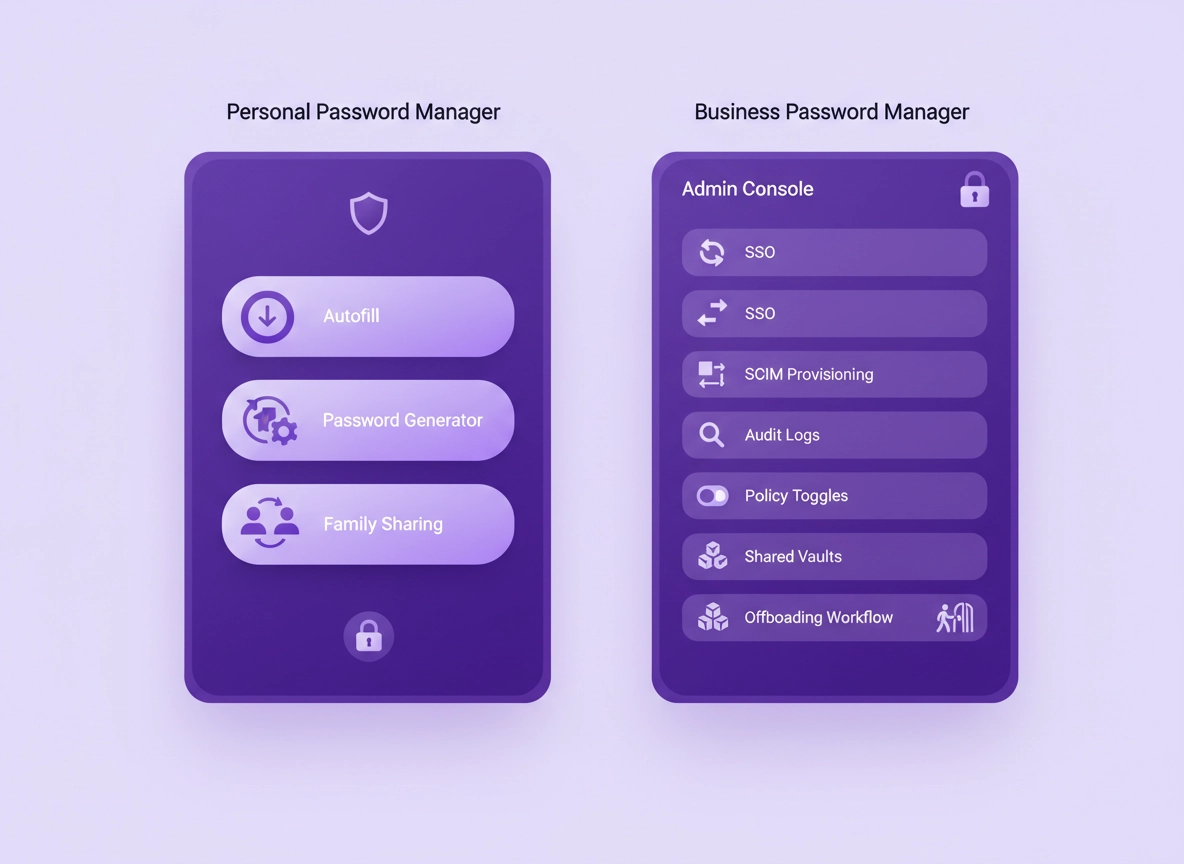
What “business vs personal” really means .
This guide focuses on plan capabilities and security outcomes, not brand-by-brand marketing.
Password managers look similar on the surface: a vault, autofill, a password generator, and syncing across devices. That’s the personal-plan core—helping one user create strong passwords, store them safely, and log in quickly without risky reuse. A personal plan might add family sharing or extra storage features, but the core assumption stays the same: you own your vault and you are the admin.
A business plan changes the assumption. The vault is no longer “just yours.” It’s part of a system that has to support onboarding, offboarding, shared access, approvals, least privilege, incident response, and auditability. In other words, a business plan exists because organizations need to answer questions like: “Who had access to this credential?”, “When was it last used?”, “Can we revoke access immediately?”, and “Can we prove our controls to auditors or customers?”
That’s why business tiers are priced differently. You’re not only paying for “more seats.” You’re paying for governance: admin controls, policy enforcement, identity integration (SSO), automated provisioning (SCIM), reporting, logs, and the ability to treat credentials as managed assets rather than personal secrets.
Related: If you’re choosing a password manager specifically for Chrome, start with Best Password Manager for Chrome and then compare overall pricing structures in Password Manager Pricing Comparison.
Key terms (quick definitions) .
- Admin console: A central place for managing users, vaults, policies, logs, and security settings.
- SSO (Single Sign-On): Logging into the password manager via your identity provider (Google Workspace, Entra ID, Okta, etc.).
- SCIM provisioning: Automated user lifecycle management (create/disable users, assign groups) based on your IdP/HR system.
- RBAC (Role-Based Access Control): Permissions and roles (e.g., admin, manager, member) that control what users can do.
- Audit logs: A record of events (logins, vault access, sharing changes, policy changes) used for security review and compliance.
- Offboarding: The process of removing a user and ensuring access to shared resources is revoked immediately.
- Vault ownership: Whether credentials live as personal items or as “company-managed” items (and what happens when someone leaves).
Why this decision affects security (not just price) .
Most real-world password incidents are not “crypto breaks.” They’re people and process failures: phishing, reused passwords, shadow IT, forgotten shared accounts, ex-employees still having access, or “everyone knows the master password to the shared email account.” A personal plan helps with password strength and reuse. A business plan helps with organizational control.
Here are the security outcomes that typically separate a business-grade deployment from a personal setup:
- Least privilege at scale: Not everyone needs access to everything. Business plans usually support group-based access and granular permissions.
- Verified identity and access: SSO makes login governance consistent with your existing security posture (MFA, conditional access, device checks).
- Fast, reliable offboarding: The business must be able to revoke access instantly—without waiting for a user to “share the vault back.”
- Audit and accountability: Logs matter during incidents and audits. Personal plans rarely provide admin-grade auditing.
- Policy enforcement: Minimum master password rules, vault lock behavior, sharing restrictions, 2FA requirements, and device approvals.
The hard truth: if your organization depends on shared credentials (SaaS admin accounts, finance systems, DNS, hosting, ad platforms), and you’re using personal plans with manual sharing, your risk isn’t theoretical. Your risk is one accidental overshare away from an “everyone had access” incident that’s impossible to cleanly unwind.
Related: If you’re deciding between a dedicated password manager and Chrome’s built-in password storage, see Chrome Password Manager vs Third-Party and the broader comparison Password Manager vs Built-in Browser Passwords.
Impact: Choosing the wrong plan can break offboarding, undermine auditability, and create “credential sprawl” that’s expensive to fix later.
Requirements checklist (the quickest way to choose) .
If you want a decision you can defend later, don’t start with a vendor’s pricing page. Start with requirements. Below is a practical checklist. If you tick any box in the Business Required column, you should strongly consider a business plan (or a true team tier) even if you’re “small.”
- You must disable a user and instantly revoke access to shared vaults.
- You need audit logs for access or admin actions.
- You require SSO (Google Workspace / Entra ID / Okta) to control sign-in.
- You want SCIM provisioning to automate onboarding/offboarding.
- You need RBAC (admin vs manager vs user) and group-based permissions.
- You must enforce 2FA/MFA and security policies centrally.
- You have compliance expectations (SOC 2, HIPAA, GDPR) that demand evidence.
- You’re a solo user managing your own logins across devices.
- Sharing is rare and done with a trusted person (spouse/partner) or a small family unit.
- You don’t need centralized policies; you can set your own security habits.
- There’s no “company-owned” credential set—everything is effectively personal.
- If something goes wrong, you can resolve it without admin tools or auditing.
- You don’t need SSO/SCIM integration with an identity provider.
The key boundary is ownership + accountability. If credentials are business assets (even for a two-person company), you want a model where access is managed by policy and roles, not by informal trust and manual sharing.
Deep dive: If you’re building an admin-grade deployment, use Chrome Password Manager Deployment Guide and review key controls like Role-Based Access, Single Sign-On, and Directory Integration.
The 10-minute decision framework .
Here’s a fast, defensible way to choose between personal and business plans without getting lost in feature lists. Treat it like a mini risk assessment: identify what can hurt you, and buy the minimum tier that prevents it.
- 1 List what you share (SaaS admin accounts, finance, DNS/hosting, ad platforms, customer data tools). If you share more than a couple of critical accounts, you’re moving toward business needs.
- 2 Define ownership: are those credentials personal or company-owned? If company-owned, don’t rely on personal vaults as the source of truth.
- 3 Assume someone leaves tomorrow: can you revoke access immediately and prove it? If not, you need admin controls and managed sharing.
- 4 Check identity requirements: if your org uses Google Workspace/Entra ID/Okta and expects MFA policies, you’ll want SSO (and often SCIM).
- 5 Decide what evidence you need: if you need audit trails (even lightweight), personal plans will feel blind during incidents.
- 6 Buy for your next 12 months, not just today: if you’re hiring, plan for onboarding/offboarding to become routine.
What “success” looks like: You can add a new teammate in minutes, give them the minimum access required, enforce MFA, and remove access instantly when needed—without changing passwords everywhere in a panic.
Quick “buy business now” triggers .
- You share admin credentials for any platform that can affect billing, customer data, or production systems.
- You use contractors and need time-limited access or fast removal.
- You need logs (or you’ve ever said “we should be able to prove who changed that”).
- You’re SOC 2 / HIPAA / GDPR conscious or sell to businesses that ask security questions.
- You already have an IdP and want consistent MFA / access rules.
Related: If your goal is cost clarity, follow up with Password Manager Cost Comparison, Total Cost of Ownership, and Password Manager ROI for Business.
Feature-by-feature: what business plans add .
Vendors love to say “business plans include more features,” but the better framing is: business plans add controls that change how risk is managed. Below is a practical breakdown of what matters, what it does, and why personal plans typically can’t replace it.
1) Admin console and policy enforcement .
Personal plans assume you are your own administrator. That’s fine until you need consistency across a team. A business plan usually adds an admin console where you can set org-wide rules like: required MFA, minimum master password standards, session timeouts, device approval, and restrictions on sharing.
Why it matters: policies stop “weak links” from becoming the default. In a team, one person with poor habits can create a shared risk surface for everyone else. A business plan shifts security from “best effort” to “enforced baseline.”
2) Team sharing that isn’t a mess .
The most expensive password problems aren’t “I forgot my Netflix password.” They’re “we can’t access the domain registrar,” or “the finance login is in someone’s personal vault,” or “the marketing contractor still has access to Ads.”
Business plans typically offer shared vaults/folders with permissions, ownership models, and guardrails: controlled sharing, share to groups, prevent resharing, require approvals for sensitive vaults, or restrict exports. This is where RBAC becomes real rather than decorative.
Related: If secure sharing is a key requirement, read Password Sharing Securely, plus the collaboration angle in Team Collaboration.
3) SSO (Single Sign-On) and identity alignment .
SSO isn’t about convenience (although it helps). It’s about aligning access to your password manager with the same identity controls you already use: MFA requirements, conditional access, device compliance, geo restrictions, and account recovery rules.
A common misconception is “we already use MFA in our password manager, so we don’t need SSO.” That can be true for tiny teams—but in many environments, SSO is the difference between “we hope everyone uses MFA” and “MFA is enforced at the identity layer the business already governs.”
Related: See Password Manager Single Sign-On and the broader identity integration page Directory Integration.
4) SCIM provisioning and lifecycle automation .
The moment hiring becomes regular, manual onboarding becomes a security issue. SCIM provisioning automates user creation, group assignment, and deactivation based on your IdP. If you can disable a user in your directory and automatically remove their password manager access, you reduce the chance of “forgotten access” to near zero.
Why it matters: offboarding is when many orgs get burned. A business plan with SCIM reduces reliance on perfect human process.
5) Audit logs and security visibility .
In a personal plan, you usually can’t answer: “Who accessed the shared vault?”, “When did sharing change?”, or “Which admin disabled MFA enforcement?” If something suspicious happens, you’re investigating with a blindfold on.
Business plans commonly include audit logs (sometimes with SIEM export on higher tiers). Even basic logs are valuable: you can detect unusual sign-ins, confirm policy changes, and produce evidence for compliance questionnaires.
6) Account recovery and continuity .
Personal plans often focus on individual recovery options (trusted devices, recovery keys, emergency access). Business plans add a different kind of continuity: ensuring the org can recover access to company-owned vaults without locking itself out if one person disappears.
Related: Review continuity options in Password Manager Recovery Options and the admin continuity angle in Emergency Access.
7) Stronger controls around extensions and browser integration .
Most teams use password managers via browser extensions. That’s practical—but it adds a security dimension: extension permissions, update channels, and policy enforcement in Chrome. Business deployments frequently combine password manager controls with Chrome enterprise controls (allowlisting extensions, restricting risky permissions, managing profiles).
Related: If your plan depends on browser-based workflows, use Browser Integration Security and consider the wider enterprise posture in Chrome Enterprise Guide.
At-a-glance comparison .
| Capability | Personal plan | Business plan | Why it matters |
|---|---|---|---|
| Autofill + device sync | Yes | Yes | Baseline security and convenience. |
| Shared vaults/folders | Limited | Managed | Prevents credential sprawl and oversharing. |
| Admin console | No | Yes | Central control, ownership, and policies. |
| RBAC + groups | Basic | Yes | Least privilege and scalable access. |
| SSO | No | Often | Aligns access with org identity controls. |
| SCIM provisioning | No | Often | Automates onboarding/offboarding reliably. |
| Audit logs | Minimal | Yes | Accountability, incident response, compliance. |
| Security policies | Per-user | Org-wide | Prevents weak configurations. |
If you want a deeper security-feature comparison across password managers and tiers, use Password Manager Security Features Comparison alongside Free vs Paid Comparison.
Security model differences: sharing, auditability, and offboarding .
If you want to evaluate plans like a security reviewer, focus on how the product behaves in three stressful scenarios: sharing at scale, incident response, and offboarding. This section breaks down what to look for.
1) Sharing: “Who can access what?” .
Personal plans typically treat sharing as a convenience feature. That’s fine for a household, but in business it can create chaos: duplicated shared folders, inconsistent permission rules, and no clear ownership model. Business plans usually introduce a more formal structure: vaults owned by the organization (or by admins), group-based access, and controls that prevent “reshare to anyone” behavior.
- Group-based sharing (share to “Finance Team,” not to 12 individuals)
- Least privilege permissions (view-only vs edit vs manage sharing)
- Controlled resharing (admins can prevent “share to outsiders”)
- Ownership clarity (company items stay company items)
2) Auditability: “Can you prove what happened?” .
The reason auditors ask about password managers isn’t because they love tools. It’s because credentials are a control point. If you can’t show evidence that access is controlled and monitored, you end up relying on “trust us.” Audit logs give you a way to answer: who logged in, who changed policy, who invited a user, and when access was revoked.
If your business ever deals with security questionnaires, client trust reviews, or regulated data, you’ll quickly learn that “we use a password manager” is not the full answer. The real answer is “we use a password manager with enforced MFA, managed sharing, and audit trails.”
Related: If compliance is part of your decision, see SOC 2 compliance, HIPAA compliance, and GDPR compliance.
3) Offboarding: “Can you remove access instantly and safely?” .
Offboarding is the moment where personal plans fail most often. If company credentials live in an employee’s personal vault, you are one resignation away from a scramble. The ideal model is: shared credentials are stored in a company-managed vault, and a user’s access is controlled by role/group membership. When you disable the user, access disappears—no heroics required.
A common misconception is that offboarding always requires password rotation. In a mature system, access revocation is immediate, and rotation becomes a targeted action: rotate only if the account itself is sensitive, if the credential was exposed, or if policy requires it. That reduces churn and avoids breaking integrations unnecessarily.
Related: If you’re reviewing the underlying security primitives (encryption, zero-knowledge design), use Encryption Explained, Zero-Knowledge Architecture, and Master Password Security.
Which plan fits your use case .
Most plan confusion disappears when you anchor the decision in how you work. Below are common scenarios and the plan features that matter most in each.
Solo user .
If you’re truly solo, a personal plan is usually enough—especially if you use strong MFA and keep recovery options safe. Prioritize: cross-device sync, strong autofill, a good password generator, breach monitoring, and secure recovery. If you do freelance work, keep client credentials in separate vaults/folders and avoid mixing personal and client assets.
Related: For solo/independent workflows, see Password Manager for Freelancers.
Family / household .
Family plans are basically “personal + controlled sharing + recovery.” They’re great when sharing is trusted and stable. Look for simple sharing, emergency access, and easy device onboarding. If your household includes teenagers or less technical users, prioritize UX and recovery safety (and set clear rules for sharing).
Startup (2–20 people) .
This is the danger zone where people try to “make personal plans work.” Startups often share critical accounts early: domain registrar, hosting, billing, analytics, email admin, ad platforms. Even if you’re only five people, those credentials are company assets. A basic business plan often pays for itself by preventing one offboarding disaster.
Minimum recommended business controls for startups: shared vaults with permissions, admin console, enforced MFA, and a clean offboarding process. If you already use Google Workspace or Entra ID, plan for SSO soon.
Related: If you’re building a startup security stack, see Best Password Manager for Startups, plus Startups Security Guide and Startups Pricing Guide.
Remote teams .
Remote work increases the need for policy enforcement and identity alignment: you don’t want vault access from unmanaged devices without MFA, and you want to reduce reliance on “tribal knowledge.” Prioritize: SSO (if possible), device approval rules, and strong sharing governance. Consider combining password manager controls with browser hardening.
Related: See Password Manager for Remote Teams and the privacy posture in Chrome Privacy for Remote Work.
SMB (20–250 people) .
At this size, lifecycle management becomes operational: onboarding and offboarding happen often enough that manual processes become expensive. SCIM starts to matter, as do role templates and audit logs. You also start encountering vendor risk questions, customer security reviews, and compliance expectations.
Enterprise / regulated environments .
Enterprise buyers are usually deciding between tiers within business plans, not between personal and business. Your baseline should include SSO, SCIM, granular RBAC, audit logs, reporting, and strong admin separation. You’ll also care about how the tool supports incident response, log export, and integrations.
Related: For enterprise-grade evaluation, start with Best Enterprise Password Manager for Chrome and For Enterprise Security Teams.
Migrating from personal to business without breaking everyone .
Many teams start on personal plans and eventually realize they need admin controls. The transition can be smooth if you treat it like a small project rather than a chaotic “everyone export/import today.” Here’s a practical migration approach that reduces downtime and avoids losing ownership clarity.
Step 1: Separate personal vs company credentials .
Before you migrate anything, decide what is a company asset. Company assets include: shared SaaS admin logins, registrar/hosting credentials, finance and billing systems, key customer tools, and any login that would impact operations if you lost access. Personal assets are everything else.
If your current reality is “company assets live in someone’s personal vault,” don’t panic. The goal is to move those assets into a managed structure (shared vaults owned by the org) and then lock down sharing rules.
Step 2: Create shared vaults around functions, not people .
A common mistake is creating vaults like “Alice’s Vault” or “Dev Vault.” Instead, create vaults based on stable business functions: Finance, Marketing, Engineering, IT/Admin, Customer Support. Then grant access via groups/roles. People change; functions persist.
Step 3: Enable MFA enforcement and set baseline policies .
Don’t wait. Once you move to business, enforce MFA and reasonable session timeouts early. Make sure every user has a recovery method that doesn’t rely on one person being online at the right time. If your org has an identity provider, plan your SSO rollout and test it with a small group before flipping everyone.
Step 4: Plan offboarding as a test case .
Treat offboarding like a “fire drill.” Disable a test user and confirm they immediately lose access to shared vaults. Confirm that company assets remain accessible to admins and teams without manual recovery. If offboarding doesn’t work cleanly, fix that before you declare the migration done.
Related migration paths: If you’re moving away from browser-stored credentials, see Migrate from Chrome Password Manager to Third-Party, plus import/export safety guides: Export passwords securely and Import passwords securely.
Troubleshooting .
If you’re confused about tiers, you’re not alone. Most “password manager plan” problems are caused by unclear ownership models, rushed sharing setups, or trying to retrofit business governance into a personal plan. Here are the most common issues and how to fix them.
If you’re on a personal plan but sharing business credentials .
Fix: stop treating sharing as the system. Instead, create a dedicated “company vault” structure in a team/business tier where the org owns the data. Then move company credentials into shared vaults, grant access via groups, and prevent resharing where possible. If you can’t do that in your current plan, that’s the point—you’ve outgrown it.
If offboarding requires changing passwords everywhere .
Fix: adopt a model where access revocation is the default response, not rotation. Rotate only the accounts that are truly sensitive or that were exposed. Business plans with managed vault ownership and group access reduce the need for emergency rotations. If you still rotate, do it with a documented checklist (who rotates what, where the new credential lives, who verifies access).
If users keep “working around” the tool .
Fix: the tool has to match workflow reality. If it’s slower than copying passwords into chat, people will do the risky thing. Improve UX by structuring vaults around teams, using clear naming, and limiting “where things can be stored.” Also ensure the browser extension experience is smooth on Chrome—many adoption issues are extension and policy related.
Related: For Chrome extension risk and policy posture, see Chrome Extension Security Check and Extension Permissions Guide.
If you’re worried about “are password managers safe?” .
Fix: evaluate the security model and your usage. Modern password managers can be a major security upgrade when used correctly: unique passwords, MFA, safe recovery, and controlled sharing. Risk increases when users reuse passwords, approve MFA prompts blindly, or share vault items outside controlled channels.
Related: Read Are Password Managers Safe for Chrome?, plus risk deep dives: Hacking Risks and Vulnerability Risks.
If you need a safe baseline for Chrome users .
Fix: combine password manager best practices with browser hygiene: keep Chrome updated, reduce risky extensions, enable security checks, and use separate profiles for work vs personal when needed. If you’re managing devices, consider Chrome enterprise policies for extension allowlisting and profile control.
FAQ .
-
helpDo small businesses really need a business password manager plan?If you share any business-critical credentials (registrar, hosting, finance, admin SaaS), a business plan becomes valuable fast. The key reason isn’t “more users”—it’s the ability to control access, offboard safely, and avoid having company credentials trapped in personal vaults. Many teams can start with an entry-level business tier and upgrade later for SSO/SCIM if needed.
-
helpCan a personal plan with shared folders replace a business plan?Sometimes for very small, stable groups—but it usually breaks at offboarding and auditing. Business plans add admin ownership models, policies, and audit logs that personal sharing features typically can’t replicate. If you need provable access control or reliable offboarding, shared folders alone are not enough.
-
helpWhat’s the single most important “business feature” to look for?Admin-controlled offboarding—the ability to disable a user and instantly remove access to shared vaults without relying on that user. After that, prioritize enforced MFA, audit logs, and SSO/SCIM if your org already uses an identity provider.
-
helpHow do business plans relate to compliance like SOC 2, HIPAA, or GDPR?Compliance frameworks usually expect access controls, least privilege, and evidence of enforcement. Business plans help because they support centralized policy enforcement, user lifecycle controls (often via SCIM), and audit logs. That makes it easier to show how credentials are protected and how access is removed when roles change.
Sources & further reading .
- NIST SP 800-63B: Digital Identity Guidelines (authentication and memorized secrets)
- OWASP Top 10: common web app risks that credential hygiene helps mitigate
- CISA: general cybersecurity guidance and best practices
- Google Chrome Help: account and browser security references
Disclosure: Some pages may mention tools or services. Recommendations are editorial and based on practical evaluation criteria (security, control, and operational fit).